
Do you ever open Netflix and think, “Wait… what happened last time?” You are not alone. We all forget plots, side characters, and tiny details. That is exactly where Netflix Summary Chrome extension comes in. This tiny tool lives in your browser and helps your brain catch up before you hit Play again.
Netflix Summary is a simple Chrome extension that gives you short, clear recaps. Instead of googling the story, you stay on netflix.com and click one button. Because of that, you save time and stay focused. And if you use shows for your ai learning language routine, Netflix Summary makes each episode easier to follow.
So in this article, we will look at what Netflix Summary is, how it works, and why it is so useful for language learners. We will also talk about safety and some quick tips, so you can decide in a few minutes if Netflix Summary is right for you.
What is Netflix Summary?
Netflix Summary is a Netflix recap extension for Google Chrome. When you watch a movie or series, it creates a recap of what you have already seen. It does not jump ahead or spoil the ending. Instead, Netflix Summary focuses on your watched part of the story.
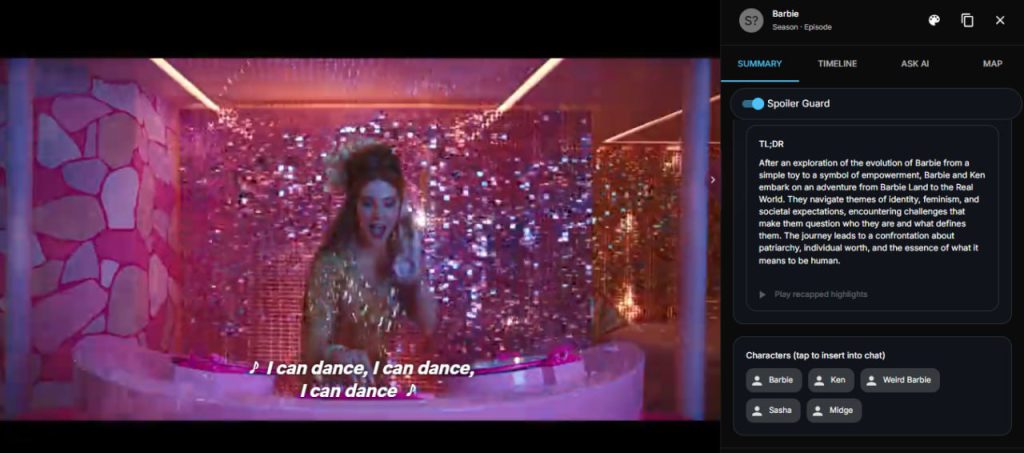
The Netflix Summary extension adds a small button on the Netflix page. When you click it, you see a short text summary. It tells you who did what, which scene was important, and what you should remember. Because the text is simple, it is great for English learners too.
Under the hood, Netflix Summary is powered by AI. It is actually Summ: Netflix Summarizer, but most people just call it Netflix Summary. The extension uses an AI model to read the episode details and then build a human-style recap. So you do not need to write prompts or copy and paste anything.
How the Netflix Summary Chrome extension works
Let’s break it down step by step, so you can imagine the whole flow.
First, you install the Netflix Summary Chrome extension from the Chrome Web Store. This part is easy and takes only a moment. After that, you pin the icon so it is always visible near your address bar.
Next, you connect it to Google’s Gemini. The extension works as a Netflix summarizer using Gemini API. You create an API key in Google AI Studio, then paste it inside the Netflix Summary extension settings. This gives the AI permission to create recaps for you.
Then you open netflix.com and play any episode. While the show is on, you click the Netflix Summary button. The ai Netflix recap tool checks what you have already watched on that profile. It then shows a spoiler free Netflix Summary of your current progress. If you stop in the middle of an episode, it will only talk about the part you have already seen.
Because of this, the Netflix Summary Chrome extension feels very natural. You stay in your seat, click once, scan the recap, and continue watching. No new app. No copy paste. No long reviews. Just Netflix Summary doing the boring memory work for you.
Over time, you start to trust that Netflix Summary has your back. You do not worry about forgetting names or twists. Instead, you relax and enjoy the show. And this relaxed feeling is very important for any ai learning language plan.
Why Netflix Summary is perfect for ai learning language
If you use Netflix to learn English, you already know one problem. When you lose the story, you also lose motivation. You stop listening carefully. You turn on your phone. You give up. Netflix Summary helps you avoid that moment.
With Netflix Summary, you always remember the last episode. So your brain is free to focus on vocabulary, pronunciation, and real-life dialogs. This fits perfectly with any ai learning language plan. You can read the recap in simple English, then listen to the same ideas in natural speech.
Also, Netflix Summary can support shadowing and speaking practice. First, you read the recap. Then, you try to retell the recap in your own words. After that, you watch the new episode and repeat key sentences out loud. Step by step, your speaking becomes smoother. Because you understand the story, you are not scared of fast lines anymore.
If you pause a series for some weeks, Netflix Summary saves you again. You come back, open the recap, and see the main events in a few lines. Instead of rewatching one whole episode, you just spend one minute reading. So your ai learning language routine stays light and fun.
You can even mix Netflix Summary with other tools. For example, you read the recap, then open a subtitle trainer or a dictionary. In this way, Netflix Summary becomes the “story base” for your whole learning session.
Is Netflix Summary safe?
Now you may ask: “Is Netflix Summary safe?” That is a fair question. The good news is that the extension is designed with clear rules. It reads the page content to know what you are watching. Then it sends text, not your password or payment info, to the AI.
Because you use your own Gemini API key, you have extra control. You can see the usage inside your Google account. And if you ever feel unsure, you can delete or change the key. As always, install the Netflix Summary extension only from the official Chrome Web Store, and never share your API key with others.
So, when used correctly, Netflix Summary is a safe helper. It just gives you extra memory for your shows and your ai learning language practice.
Quick tips to get the most from Netflix Summary
To make Netflix Summary really helpful, use it as part of a small system.
-
Before you watch, click Netflix Summary and skim the recap.
-
While you watch, notice how the recap matches the dialog.
-
After you watch, open Netflix Summary again and read it out loud.
-
Once a week, review old recaps to refresh your memory.
With these steps, Netflix Summary becomes more than a one-time tool. It turns into a gentle study partner that keeps your series clear in your head. And because it is always just one click away, it fits nicely into a busy day.
You can even make a tiny ritual. First, Netflix Summary recap. Then, play. In the end, quick review. This rhythm is simple, but it keeps your ai learning language habit strong.
Netflix Summary vs other recap options
You might wonder, “Why not just search the web for a recap?” Of course, you can. But normal recap sites are slow and full of spoilers. You leave Netflix, open a new tab, fight with ads, and sometimes read about seasons you have not watched yet. With Netflix Summary, you avoid all that.
Because Netflix Summary lives inside your player, it feels smoother. You click once and stay in the same place. The recap is shorter and more focused on your current spot. For many learners, this is the main difference. The less friction you have, the easier it is to keep your ai learning language habit alive.
And yes, there are other tools. Still, Netflix Summary keeps things very simple. It does not try to change the whole interface. It does not ask you to sign up for a big platform. It just gives you the key info you need. That is why many people see it as one of the best Chrome extensions for Netflix summaries, especially if they care about learning, not just binge-watching.
FAQ: quick answers about Netflix Summary
Does Netflix Summary work on every Netflix title?
Most of the time, yes. As long as you watch on netflix.com in Chrome, Netflix Summary can usually read the page and build a recap. Very new or very niche titles may sometimes be less accurate, but this is rare.
Can I use Netflix Summary on my phone or TV?
Right now, Netflix Summary is a Chrome extension. So it works on desktop or laptop in the browser. Mobile apps and smart TVs do not support Chrome extensions yet. Because of that, many learners keep Netflix Summary for study sessions on their computer.
Is Netflix Summary free to use?
The extension itself is free to install. However, the AI runs through your Gemini API key. Google often offers a free tier, but heavy use may cost a bit later. So it is smart to check your Google AI Studio usage from time to time while using Netflix Summary.
Will Netflix Summary replace subtitles or language tools?
No, Netflix Summary is not a full study platform. It is more like a smart notebook that remembers the story for you. For deep practice with subtitles, flashcards, and speaking, tools like FunFluen are a better match. But when you mix both, your learning becomes stronger and much more fun.
Meet FunFluen: your next step after Netflix Summary
Netflix Summary is amazing for quick story recaps. However, if you want to push your English even further, you will need more active practice. This is where FunFluen comes in.
FunFluen is our smart extension and app for learning languages with Netflix, YouTube, and Disney+. It shows dual subtitles, lets you pause and repeat lines, and even has a “Fluency Gym” where you guess and speak movie dialogs. So you can use Netflix Summary to remember the story, and then use FunFluen to train your listening, vocabulary, and speaking with every scene. Together, they make your ai learning language journey smoother, easier, and a lot more fun.