
Watching movies can be more than just a way to relax. What if you could turn your Netflix, YouTube, or Disney+ session into a language-learning powerhouse?
FunFluen, a Chrome extension for language learning, does exactly that. Whether you’re trying to improve your vocabulary, boost listening comprehension, or speak more fluently—FunFluen helps you reach your goals with real content and smart tools.
Let’s explore what makes FunFluen an essential tool for learners and how both free and paid users can benefit.
🧠 What Is FunFluen and How Does It Work?
FunFluen is a Chrome extension for language learning that works on Netflix, YouTube, and Disney+. It overlays interactive learning tools onto your video content so you can:
-
Read dual subtitles in real-time
-
Listen and guess movie lines with the Fluency Gym
-
Speak by mimicking actors’ voices and checking your pronunciation
-
Explore vocabulary and grammar using AI insights and subtitle-based learning
It’s available as both a browser extension and a mobile app. The mobile app currently supports Disney+ and YouTube with the same smart learning tools as the desktop version.
🆓 Free vs. 🔐 Paid Features at a Glance
Here’s a quick look at what you get in the free plan vs the premium plans:
| Feature Type | Free Plan ✅ | Paid Plan 🔐 |
|---|---|---|
| Dual Subtitles (CC) | ✅ | ✅ |
| Machine Translation (YouTube only) | ✅ | ✅ |
| Sidebar Access | ✅ | ✅ |
| Fluency Gym | ✅ | ✅ |
| 3rd Subtitle (Netflix only) | ❌ | ✅ |
| Hover Dictionary | ❌ | ✅ |
| AI Insight Tools | ❌ | ✅ |
| Export as Anki/CSV/Other Formats | ❌ | ✅ |
🔍 Free Features Explained: Learn Without Paying a Cent
Even without a subscription, FunFluen gives you powerful tools to start learning. Here’s what you can use for free:
| Feature | Platforms | What It Does |
|---|---|---|
| Dual Subtitles | Netflix, Disney+, YouTube | Shows both original and translated subtitles together |
| Sidebar | All | Lets you view, copy, save, and share subtitles |
| Text Export | All | Save subtitles in plain text for offline practice |
| Word & Sentence Pronunciation | All | Hear the pronunciation of subtitles directly from audio |
| Fluency Gym | All | Practice reading, listening, and speaking (see below 👇) |
| Fullscreen Mode Support | All | Sidebar and tools work even in fullscreen video |
| Keyboard Shortcuts | All | Play next/prev sentence, save sentence, change speed, etc. |
| Machine Translation (YouTube) | YouTube only | Shows translated subtitles if official ones don’t exist |
👉 As a free user, this is more than enough to actively learn while watching movies, especially if you’re focused on vocabulary, listening, and reading.
💼 Paid Features: Unlock the Full Power of FunFluen
Ready to dive deeper? Upgrading to a premium account unlocks a powerful set of tools that make learning more personalized, comprehensive, and professional.
| Feature | Platforms | Why It Matters |
|---|---|---|
| Third Subtitle (Netflix only) | Netflix | Adds a third line (e.g., phonetic transcription or another language) |
| Machine Translation (Disney+, Netflix) | Disney+, Netflix | Supports languages that don’t have native subtitles |
| Hover Dictionary | Disney+, Netflix | Hover over any word for a real-time translation |
| Advanced Export (Anki, CSV, etc.) | All | Export subtitles and vocab into flashcards or study tools |
| AI Packs & Insights | All | Get smart suggestions on grammar, idioms, and phrases |
| Save + Edit Vocabulary | All | Organize your saved words, add notes, filter by movie |
| Phonetics (JP, CN, KR) | All | See pronunciation guide for Asian languages |
| Advanced Shortcuts | All | Adjust subtitle timing, toggle repeat, control subtitle visibility |
💸 Plans & Pricing
Each plan includes a free trial, so you can try before you buy:
| Plan | Duration | Free Trial | AI Pack Access |
|---|---|---|---|
| Silver | 30 days | 10 days | 1 day |
| Gold | 1 year | 30 days | 4 days |
| Platinum | 1 year | 30 days | 20 days |
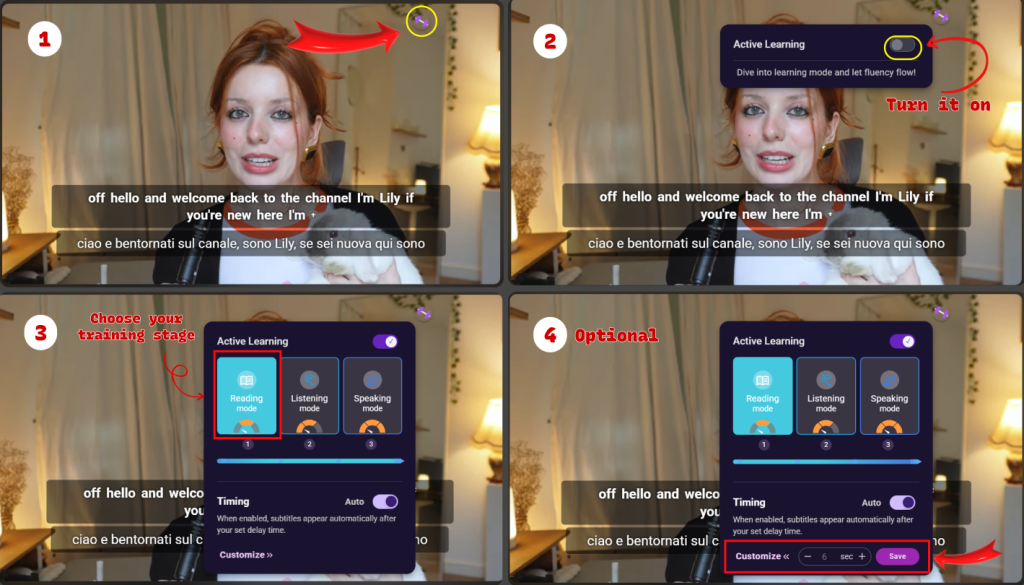
🧠 Fluency Gym – Where Real Fluency Happens
Let’s face it—watching movies in a new language is fun, but passively watching won’t get you fluent. That’s why FunFluen includes a powerful tool called Fluency Gym. It’s one of the best reasons to try this Chrome extension for language learning—because it’s not just about subtitles, it’s about speaking like a native.
Fluency Gym breaks the learning process into three simple but super effective steps:
🟢 Stage 1: Reading Mode
This is your warm-up. You watch a movie or series with subtitles, just like normal. But here’s the twist:
-
You can hover over any word to hear how it sounds.
-
If the word is tricky, just save it to your flashcards for review later.
-
You get both the foreign language and your native language subtitles, making it easy to understand what’s going on.
🟡 Stage 2: Listening Mode
Now we turn up the challenge.
-
The video pauses right before each subtitle line.
-
You only hear the dialogue, with no subtitles showing.
-
Try to guess what was said, then compare with the actual subtitle when it appears.
This step trains your ear and improves active listening—a crucial skill for real conversations.
🔴 Stage 3: Speaking Mode
This is where the magic happens.
-
You first see the subtitle in your native language.
-
Then the video pauses, and you’re asked to say the line in the target language.
-
After a few seconds, the real foreign subtitle appears so you can check yourself.
-
Then, hear the actor’s voice and compare your pronunciation with theirs.
Fluency Gym is not about guessing in your head—it’s about actually speaking out loud, correcting yourself, and improving with every sentence. Whether you’re watching Netflix, Disney+, or YouTube, this mode turns every scene into a mini speaking test—in the best way possible.
👉 If you’ve ever felt stuck between intermediate and advanced, this is your key to leveling up.
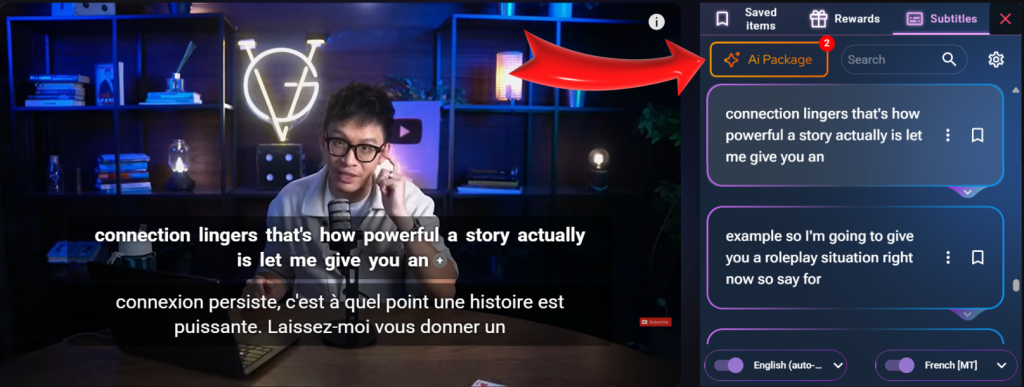
The AI Package in FunFluen saves subtitle insights, allowing learners to explore meanings through context-rich mindmaps.
🤖 AI Pack – Learn Smarter, Not Harder
You might be wondering—“What makes FunFluen smarter than other tools?” The answer: the AI Package.
This isn’t just a cool-sounding add-on. It’s like having a personal language coach built into your movies.
Here’s what the AI Pack includes:
🎯 Intelligent Phrase Detection
The AI automatically scans every episode or movie and highlights:
-
Phrasal verbs
-
Idioms and proverbs
-
Common expressions
-
Grammar structures
-
Words that match your level
So instead of randomly trying to learn everything, you get a curated list of what actually matters.
🧩 Learning Made Visual: Mind Maps
Each movie or episode comes with a mind map of the most important phrases.
This helps you:
-
Group similar vocabulary
-
Understand relationships between ideas
-
Memorize more efficiently
It’s like turning the movie into a language learning textbook, but way more fun and interactive.
📦 Custom PDF Downloads
Finished a movie? You can download a PDF that includes all:
-
Important vocabulary
-
Translations
-
Example sentences
-
Time-stamped subtitle lines
You can even use these PDFs offline, or print them for on-the-go study.
📚 Personalized by Language Level
Whether you’re a beginner or an advanced learner, the AI adapts its suggestions to your level.
So you’re not overwhelmed, and you’re not bored either.
🗺️ Bonus: Language Learning Roadmap
FunFluen gives you a roadmap to follow as you learn from your favorite series.
| Feature | Description |
|---|---|
| TV Show Milestones | Each season/episode becomes a language milestone |
| AI-Picked Content | Level-appropriate grammar and vocab highlighted by AI |
| Flashcard Sync | Instantly save phrases to flashcards for future review |
| Mind Maps | Visual representation of key ideas and vocab |
| PDF Downloads | Export curated vocabulary for offline review |
This helps you stay on track and keep learning at your own pace.
🚀 Get Started with FunFluen
FunFluen turns screen time into learning time.
If you’re looking for a Chrome extension for language learning, it doesn’t get better than this.
With its subtitle support, smart tools, AI help, and speaking practice—all wrapped in a sleek, fun interface—you’ll finally enjoy learning a language.
🔗 Install the Extension
📱 Try the App
🎁 Start with a Free Trial
🌟 About Our Brand: AppForLanguage
AppForLanguage is the developer behind FunFluen.
We believe that language learning should be fun, effective, and immersive.
With thousands of users and years of experience, our tools are built by passionate language learners, for language learners like you.
📺 YouTube Tip: Practice Listening with @SpeakingAndListeningGYM
Want extra speaking and listening help?
Check out our channel @SpeakingAndListeningGYM – where we break down real-life phrases and dialogues using clips from popular shows.
👉 Watch here: