So, you love Netflix and want to learn Spanish? Perfect. You’re about to discover how to turn your guilty-pleasure binge sessions into legit language lessons. No textbooks, no stress—just La Casa de Papel, popcorn, and progress. Let’s dive in!
Why Netflix is Your New Spanish Teacher
First off, learning Spanish with Netflix isn’t just a hack—it’s a game-changer. Here’s why:
- Real-world immersion: Textbooks teach “Hola, ¿cómo estás?” Netflix shows you how real people argue, joke, and flirt in Spanish.
- Vocabulary in context: Instead of memorizing random words, you’ll learn phrases like “¡Vamos!” (Let’s go!) or “¿En serio?” (Seriously?) from actual conversations.
- It’s fun: Let’s be real—watching Narcos beats flipping flashcards any day.
Plus, studies show that combining entertainment with learning boosts retention. So, yeah, you’re basically hacking your brain. 🧠
How to Set Up Netflix for Spanish Learning
Ready to tweak your Netflix? Here’s how to turn it into a Spanish learning powerhouse:
- Change your profile language to Spanish:
- Go to “Manage Profiles” > Edit your profile > Set “Language” to Español.
- Boom! Now even Netflix’s menus become mini-lessons.
- Swap audio and subtitles:
- While watching, click the speech bubble icon 💬.
- Choose Spanish audio + English subtitles (for beginners) or Spanish subtitles (for pros).
Pro tip: Start with shows you’ve already seen in English. You’ll grasp the plot faster, so you can focus on the language!
Top Apps to Supercharge Your Netflix Learning
Want to level up? Pair Netflix with these Spanish learning apps:
1. Language Reactor (Formerly Language Learning with Netflix)
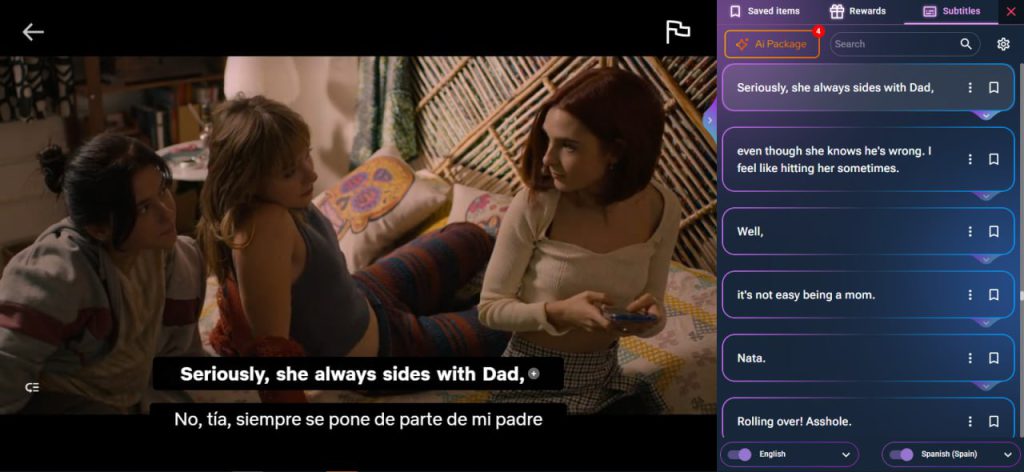
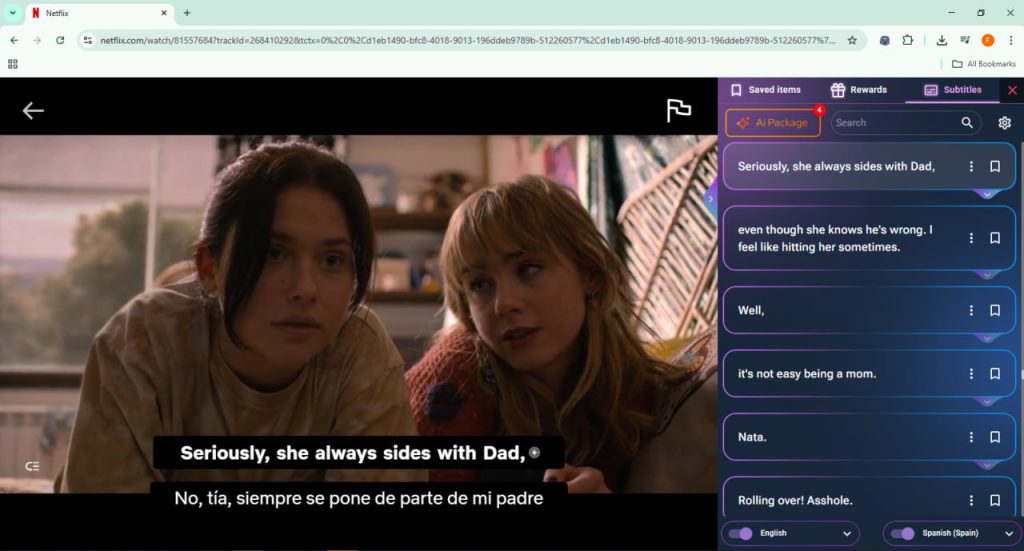
This free Chrome extension adds dual subtitles, a pop-up dictionary, and lets you replay lines instantly. Perfect for dissecting fast-paced scenes in Elite.
2. Lingopie
Think “Netflix meets flashcards.” Lingopie lets you click subtitles for instant translations and saves new words to review later. Ideal for Club de Cuervos fans.
Both apps make learning Spanish with Netflix interactive, so you’re not just zoning out on the couch.
Step-by-Step: Learn Spanish with Netflix + Language Reactor
Let’s get technical (but keep it simple):
- Install Language Reactor from the Chrome Store.
- Open Netflix and pick a Spanish show (tip: start with cartoons—they’re slower).
- Enable dual subtitles: See Spanish and English side-by-side.
- Pause & repeat: Click any line to replay it until your ears catch the rhythm.
- Save tricky phrases: Export them to flashcards for later practice.
Voilà! You’re now studying without “studying.”
Best Shows & Movies on Netflix for Learning Spanish
Not sure what to watch? Here are crowd favorites:
- Beginner:
- Coco (Colorful, simple dialogue)
- La Familia P. Luche (Silly humor, clear speech)
- Intermediate:
- Money Heist (La Casa de Papel) (Drama + everyday slang)
- Nailed It! México (Fun reality show)
- Advanced:
- El Marginal (Street slang galore)
- Monarca (Business Spanish + family drama)
7 Tips to Actually Learn Spanish (While Binge-Watching)
- Active watching > passive scrolling: Pause to repeat phrases aloud.
- Keep a “Netflix notebook”: Jot down cool slang (¿Qué onda? = What’s up?).
- Mix apps + Netflix: Use Lingopie for vocab drills after episodes.
- Shadowing: Mimic the actors’ accents. Yes, it feels silly. Yes, it works.
- Start short: 15-minute episodes > 3-hour movies. Try Minimalisto.
- Rewatch episodes: Notice new details each time.
- Join Reddit groups: r/Spanish or r/languagelearning for motivation.
“But I’m Struggling!” – Common Hurdles & Fixes
- “They talk too fast!” → Slow down playback (Language Reactor lets you do this).
- “I don’t get the slang!” → Stick to kids’ shows first (Puffin Rock is adorable).
- “I keep forgetting words!” → Use apps like Anki to review saved phrases daily.
Remember: Even understanding 10% of an episode is progress. Celebrate small wins! 🎉
FAQs: Learning Spanish with Netflix
Q: Can I become fluent just by watching Netflix?
A: Not fluent, but it’ll boost listening skills and vocab. Pair it with speaking practice!
Q: Should I use Spanish or English subtitles?
A: Beginners: English subtitles. Intermediate: Spanish subtitles. Advanced: No subtitles!
Q: What if my Netflix doesn’t have Spanish audio?
A: Use a VPN to access libraries from Spain/Mexico.
Ready to Start? Meet Your New Sidekick: AppForLanguage
Psst—want to make learning Spanish with Netflix even easier? Say hola to AppForLanguage, our genius Chrome extension. Here’s why you’ll love it:
- Dual subtitles + instant translations: No more frantic Googling.
- Vocabulary tracker: Auto-saves words you click, then tests you later.
- Speed control: Slow down Pablo Escobar’s rants to a learner-friendly pace.
Basically, it’s like having a tutor inside Netflix. 🚀
👉 Try AppForLanguage Free for 7 Days
Final Thought: Learning Spanish doesn’t have to be boring. Grab your remote, pick a show, and let Netflix do the heavy lifting. Before you know it, you’ll be yelling “¡Por supuesto!” instead of “Of course!” 🥳
¡Buena suerte! (Good luck!)