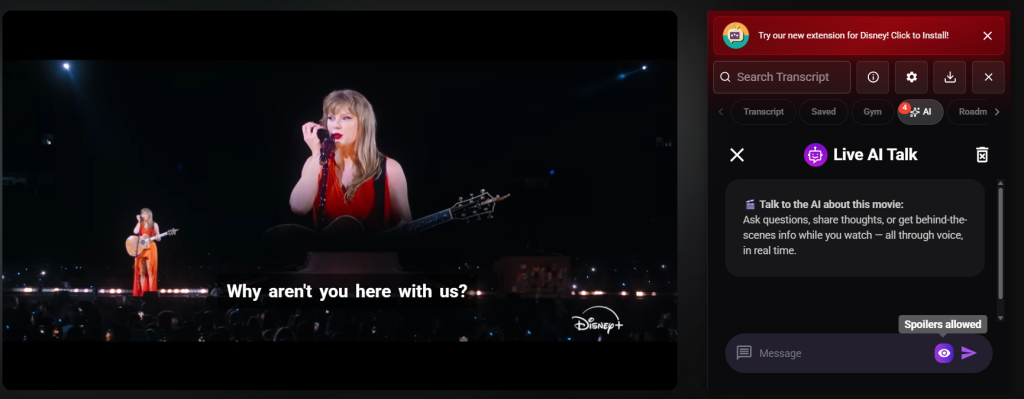
Most learners watch shows to improve their English… but stay completely silent the whole time.
The result? Lots of passive input, very little speaking, and slow progress. And Learning with AI while watching a movie can be a key to learn faster.
AI Buddy changes that. It turns every movie, series, or YouTube video into a live Learning with AI session where you can Chat with AI about what you’re watching in real time.
You don’t leave the video.
You don’t switch tabs.
You just chat while watching a movie—and the movie itself becomes your teacher, tutor, and conversation partner.
What Is AI Buddy?
AI Buddy is your personal speaking partner inside Funfluen.
It lives right beside your subtitles and lets you:
-
Ask about confusing lines
-
Practice speaking and writing
-
Discuss characters, plot, emotions, and culture
-
Get level-based explanations and examples
-
Save what you learn into review packs, flashcards, and PDFs
All of this happens while you Chat with AI directly about the scene on your screen.
With AI Buddy, your show isn’t just entertainment anymore—it becomes an interactive language lab.
Why Learning with AI Inside the Movie Is So Powerful
Most tools make you:
-
Pause the video
-
Search Google or a dictionary
-
Lose focus and never actually speak
AI Buddy keeps everything in one place so that:
-
You Chat while watching a movie without breaking immersion
-
You turn interesting moments into conversation and practice
-
You feel less shy because you’re talking to an AI, not a human
-
You get instant feedback instead of waiting for a teacher
This is Learning with AI designed for real-life fluency:
you watch → you notice a phrase → you talk to AI Buddy → you use the phrase yourself.
How to Use AI Buddy Step by Step
1️⃣ Open your movie or video
-
Disney+
-
Netflix
-
YouTube
2️⃣ Turn on Funfluen
Make sure the extension is active on your browser.
3️⃣ Watch a scene as usual
Enjoy the episode, film, or clip.
4️⃣ Open the AI tab
You’ll see AI tools, including AI Buddy.
5️⃣ Click “AI Ask” next to AI Buddy
This opens a chat box directly on top or beside the video.
6️⃣ Start a conversation
Ask or say things like:
-
“What does this sentence mean in simple English?”
-
“Explain this joke. Why is it funny?”
-
“Give me 3 similar phrases I can use in daily life.”
-
“Correct my sentence and make it sound more natural: …”
7️⃣ Chat like you’re messaging a friend 🤗
You can type or (if available) use your voice to send messages and practice speaking.
8️⃣ Control how much AI Buddy sees 👁️
Use the eye button to choose:
-
Scene-only mode – AI Buddy uses only what you’ve already watched
-
Full-video mode – AI Buddy can use context from the whole video
9️⃣ Clean up anytime 🗑️
Use the trash icon to clear your chat and start fresh.
You’re literally Chatting with AI while watching a movie.
No extra apps, no switching windows—just you, your show, and your AI Buddy.
What You Can Ask (Practical Examples)
You can use AI Buddy for almost any language question tied to the video:
-
Vocabulary & meaning
-
“What does ‘I’m beat’ mean here?”
-
“Is this phrase formal or casual?”
-
-
Grammar & structure
-
“Why do they say have been instead of was?”
-
“Explain this sentence like I’m a beginner.”
-
-
Pronunciation & speaking
-
“How should I pronounce this sentence slowly?”
-
“Show me where to pause when I say this line.”
-
-
Idioms, culture, and tone
-
“Is this sarcastic or serious?”
-
“Is this something people really say in everyday conversation?”
-
-
Practice & correction
-
“I’ll write my version of this line. Please correct it and make it sound natural.”
-
“Ask me 5 questions about this scene so I can practice answering.”
-
This is not a static dictionary. It’s Learning with AI that responds to the exact scene, mood, and context you’re watching.
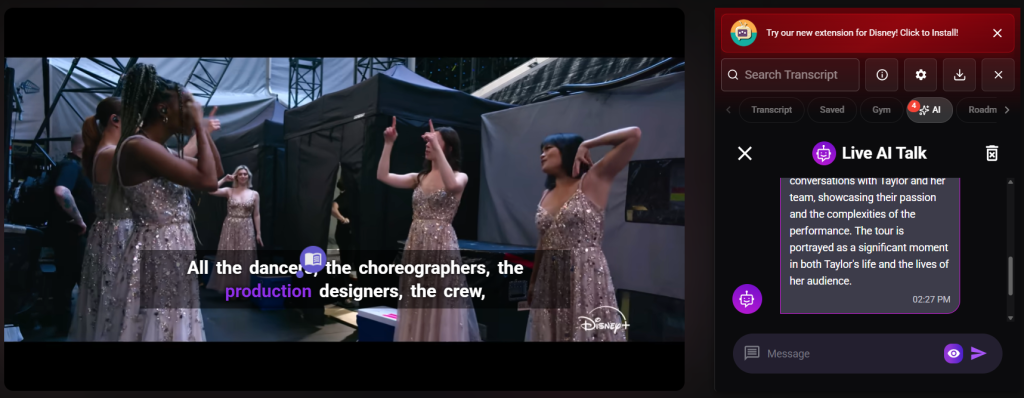
Core Capabilities of AI Buddy
🌟 Natural Conversation: Ask Anything, Learn Instantly
-
Ask about words, phrases, grammar, idioms, tone, or emotions
-
AI Buddy uses the video context, not random examples
-
Feels like you Chat with AI as a friendly tutor, not a dry textbook
🎯 Level-Aware Explanations
-
AI Buddy adjusts to your English level
-
You can ask for:
-
“Explain this for A2 level”
-
“Give me an advanced explanation”
-
-
Focus stays on phrases and structures that actually push your fluency forward
📦 Context Packs & Review Materials
Turn one scene into a full mini-lesson:
-
Get Context Packs containing:
-
Key phrases
-
Definitions in simple English
-
Example sentences
-
Timestamps from the video
-
-
Export what you learned to:
-
PDF study packs
-
CSV / Anki flashcards
-
Your existing review system
-
This means your Chat with AI becomes reusable study material—not just a one-time chat.
🔗 Connected to the Funfluen Ecosystem
AI Buddy doesn’t live alone. It works together with:
-
Graded phrase highlights
-
Funfluen’s 15,000-word roadmap
-
See which phrases are suitable for your level
-
-
Fluency Gym modes
-
Practice listening, speaking, and reading with the same lines you chatted about
-
-
Mind maps & AI Packs
-
Turn scenes into vocabulary networks and topic-based study sessions
-
Your Learning with AI becomes a full system, not just a chat box.
🤝 Sharing, Saving, and Reviewing
-
Save tricky lines you don’t want to forget
-
Turn them into:
-
Flashcards
-
Anki decks
-
CSVs
-
PDF packs
-
-
Share your favorite expressions or jokes with friends who also learn languages
You’re not just Chatting with AI. You’re building a personal library of phrases that matter to you.
How AI Buddy Supports Your Study Flow
Supported outputs & features:
-
Scene-based phrase extraction ✅
-
Idioms & phrasal verbs from your shows ✅
-
Conversation logs (your chats) for later review ✅
-
Export to CSV / Anki ✅
-
PDF vocabulary packs ✅
-
Mind map snapshots ✅
-
Voice + text practice ✅
You watch → you chat → you export → you review → you improve.
Why AI Buddy Is Different from Other Tools
Most tools either:
-
Only show subtitles
-
Only provide dictionary lookups
-
Or require you to leave the video and open another app
AI Buddy is built for Chat while watching a movie, so:
-
✅ The chat box lives inside the player — no tab switching
-
✅ Supports Disney+ and YouTube (and more with Funfluen)
-
✅ AI automatically highlights useful expressions instead of just waiting for you to click
-
✅ The tone is friendly — it feels like a conversation, not an exam
-
✅ You get grammar, idioms, cultural notes, and tone explained clearly
-
✅ You practice speaking and writing in a realistic way
AI Buddy doesn’t replace your movie.
It brings the learning into the movie and uses every scene as a lesson.
Quick Tutorial (Cheat Sheet)
-
Open any movie, episode, or YouTube video.
-
Enable the Funfluen extension.
-
Go to the AI tab.
-
Click AI Ask next to AI Buddy.
-
Start to Chat with AI about the video.
-
Toggle the 👁️ icon to switch between:
-
Scene-only context
-
Full-video context
-
-
Save interesting lines and explanations.
-
Export to PDF or flashcards for review.
-
Use 🗑️ to clear the chat when you want a fresh start.
-
(Optional) Speak your messages to train pronunciation and confidence.
Visual Ideas for Your Docs / Landing Page
You can show AI Buddy in action with:
-
📽️ A short GIF: click on a highlighted phrase → “Why this tense?” → AI Buddy shows a quick explanation.
-
📄 Screenshot: a PDF context pack generated from one scene.
-
🧠 Mind Map: a network of vocabulary from one episode.
-
📁 Flashcard flow: saved words → exported to Anki → daily review.
-
🗣️ Voice demo: a clip of a learner speaking to AI Buddy and getting corrections.
These visuals help users immediately understand Learning with AI inside their favorite shows.
FAQs
❓ Does AI Buddy work without official subtitles?
Yes. ✅ You can use machine-translated captions, and AI Buddy will still work with those lines.
❓ Can I upload my own subtitle files?
Yes. ✅ Add your own subtitle file as a second track, and continue to Chat with AI about those custom lines.
❓ Can I export what I learn?
Yes. ✅ You can export to:
-
PDF study packs
-
CSV / Anki flashcards
-
Notes and saved phrase lists
❓ Can I talk by voice instead of typing?
Yes (where supported). ✅ You can speak to AI Buddy, get real-time feedback, and train pronunciation and rhythm while you Chat while watching a movie.
❓ Does AI Buddy replace a real teacher?
No. AI Buddy gives you constant practice, explanations, and correction, so your teacher can focus on coaching, strategy, and deeper questions—instead of answering “What does this phrase mean?” 100 times.
Call to Action: Turn Your Next Movie Night into an AI Lesson
🎬 Open your favorite scene.
🗣️ Say or type one line to AI Buddy.
💬 Get a real reply, correction, or explanation.
That’s it—you’ve just started Learning with AI in the most natural way:
by Chatting with AI while watching a movie you actually enjoy.
👉 Install Funfluen
👉 Start your free trial
👉 Say hello to AI Buddy and begin speaking more confidently, one scene at a time.