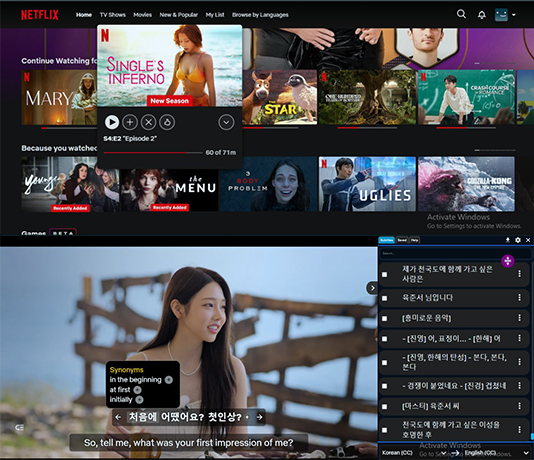
Learn any Language, just by watching Netflix or YouTube with subtitles
From Dual Subtitles to Full Fluency: Master Immersion Watching on Netflix
Funfluen’s interactive subtitles help you improve listening skills while watching your favorite shows.”
Ever wondered when to finally stop using subtitles and go fully native? If you’re like most advanced learners, you’ve hit that moment — you understand enough to enjoy shows in your target language, but you’re still stuck reading. Well, today’s the day to change that. In this guide, we’ll show you how to smoothly transition from dual subtitles on Netflix to full immersion — without overwhelm, without confusion. And yes, we’ll share how our powerful Chrome extension makes this transition effortless and fun.
🎯 Why Watching Netflix Without Subtitles Matters
Let’s get real — the dream isn’t reading foreign subtitles, right? You want to understand the language as it’s spoken, just like native speakers. That’s where Netflix immersion comes in.
Watching without subtitles:
Improves listening skills fast
Trains your brain to process natural speed
Exposes you to real-life vocabulary and pronunciation
Builds confidence with spoken fluency
Plus, research shows that reducing reliance on reading (aka “cognitive load”) helps your brain absorb spoken input more deeply. So, less reading = more natural learning.
🌍 Phase 1: Start with Dual Subtitles
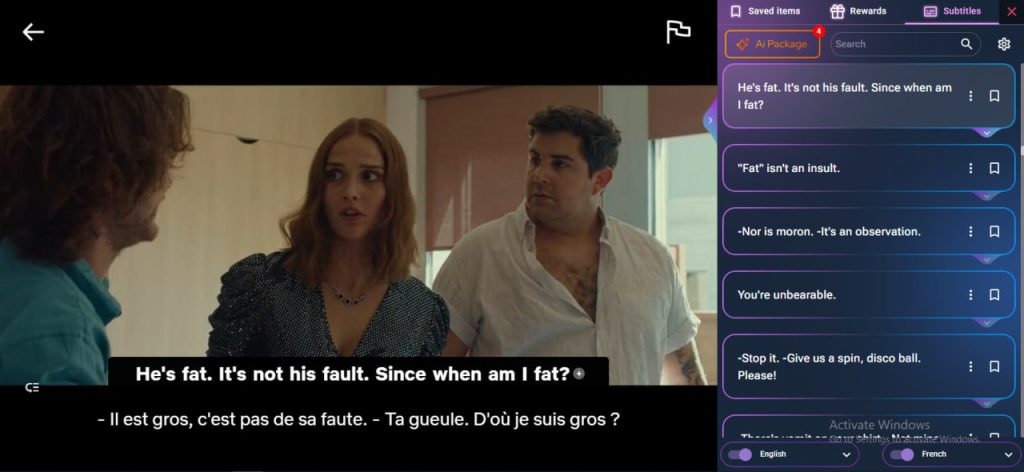
Let’s be clear: dual subtitles on Netflix are not cheating. They’re the smartest way to begin.
You get the best of both worlds:
One line in your native language for quick understanding
One line in your target language to train your ear and memory
💡 Pro Tip: With our Learning Language with Netflix extension, you can:
🖼️ Image Suggestion: Screenshot showing dual subtitles on Netflix Alt: “Learning with dual subtitles on Netflix” File name: dual-subtitles-netflix.jpg
This phase is all about building trust in your brain. You’re hearing, reading, and understanding in context — no more guessing!
⚙️ Phase 2: Switch to Target-Language-Only Subtitles
Now that you’re comfy with dual subtitles, it’s time to raise the bar. Start watching with only the target-language subtitles. It’s more challenging — but also more rewarding.
This shift forces your brain to:
Recognize sentence structure
Recall vocabulary faster
Rely less on translation
✨ Our extension makes this painless with subtitle toggling for language learners. Just tap a keyboard shortcut to hide or switch subtitles instantly. No need to fumble with Netflix settings!
🎬 Try it with familiar shows first — like your favorite sitcoms or series you’ve already watched. You’ll be surprised how much you understand!
🔁 Phase 3: Try No Subtitles for Familiar Shows
Yes, this part sounds scary. But you’re ready for it. Begin watching without any subtitles at all — but only on shows you know well.
Why?
You already understand the plot
You can focus purely on listening
Your brain won’t panic because you’ve seen it before
🧠 Use the extension’s:
Smart Pause (automatically stops after each line)
Auto-Rewind (to repeat tricky parts)
Instant Translation (if you really get stuck)
This gives you a soft landing into full immersion.
🚀 Phase 4: Go Fully Immersive with New Content
Now for the big leap — watching new content with no subtitles at all.
It takes a mindset shift, but it’s the most natural way to learn:
You’re forced to rely on tone, context, and memory
You begin thinking in the language
You develop “native-like” listening skills
🏋️♀️ Use features like:
Fluency Gym™ for speaking and shadowing practice
Quiz Mode after each scene
Word Roadmap™ to track your progress
AI Pack for grammar tips and sentence breakdowns
Learn a new language with this Netflix subtitle learning tool using handy keyboard shortcuts on your TV.
“Using this tool, I finally watched a whole episode of Dark without a single subtitle—felt amazing!” – Maria, German Learner
😖 Common Pitfalls & How to Beat Them
Problem
Solution using our extension
“I miss too much”
Use Smart Pause + Auto Rewind
“It’s too fast”
Slow it down with playback speed control
“I forget words”
Save them to Word Roadmap + review with flashcards
Learning isn’t about perfection. It’s about tiny wins, day by day.
🎓 Pro Tips for Advanced Learners
Schedule 1–2 subtitle-free sessions per week
Rewatch episodes to reinforce listening
Use Fluency Gym™ after each session
Save unknown words and review them later
Make it a habit — 15 minutes a day is enough
Language isn’t learned. It’s absorbed.
💬 Wrap-Up: You’re Ready to Go Native
Moving from dual subtitles on Netflix to full immersion is a huge step. But you don’t have to do it blindly.
With the right tools and strategy, you can:
Train your brain
Build confidence
Understand movies like a native
💡 Ready to Ditch the Subtitles?
If you’re serious about fluency, it’s time to level up. Download our extension Learning Language with Netflix and make real progress every time you press play.
AppForLanguageis more than a subtitle tool — it’s a full learning system for Netflix lovers. It’s perfect for people who want to learn languages naturally, while watching shows they already love.
With features like dual subtitles, AI packs, smart pause, vocabulary tracking, quizzes, and more — you can go from beginner to fluent while binge-watching.
🎉 Don’t study harder. Watch smarter — with AppForLanguage.