New here or feeling a bit lost?
The Help section is your go-to place for learning how to use the extension — step by step, with videos, guides, and answers to your questions.
Whether you’re just starting or want to unlock more advanced features, we’ve got you covered.
✅ Why it’s helpful:
- 🎥 Watch short, clear tutorial videos for every feature
- 🧭 Follow guided feature tours with tooltips and onboarding
- 📘 Read simple explanations of how everything works
- 📩 Reach out if you still have questions — we’re here to help 😇
👣 How to access Help & Guidance:
1.In the subtitle tab on extension sidebar, click the info icon (ℹ️)
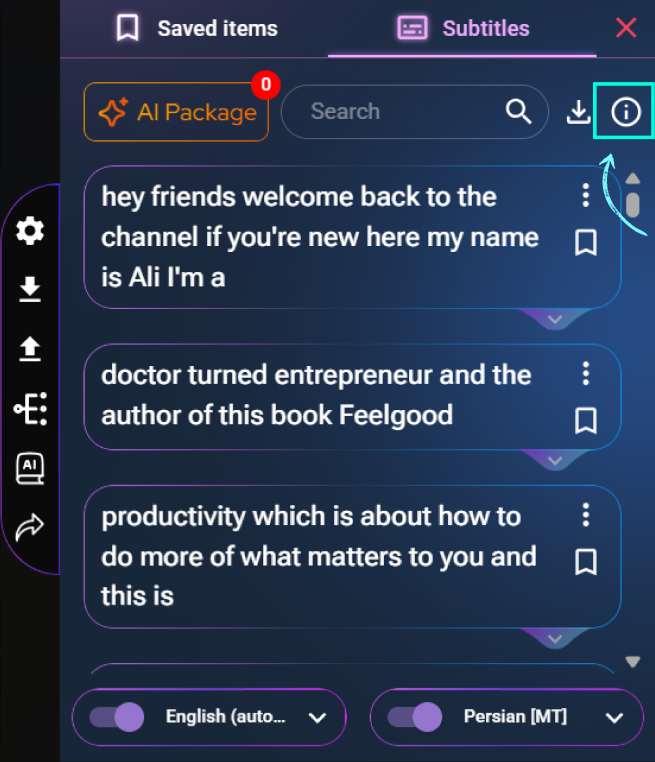
2. The Help page will open right in the sidebar
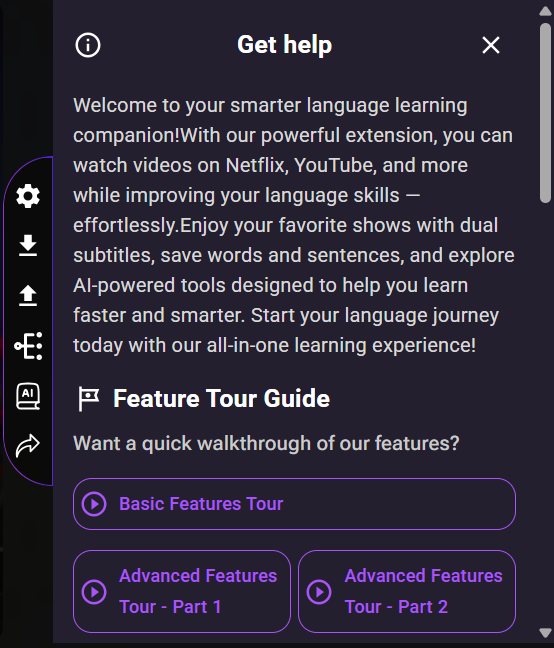
3. Here’s what you’ll find:
-
- 🗂️ Feature Tour Guides – Click any of the 3 quick guides to see feature tooltips and onboarding tips in action
- 🎬 Educational Videos – Learn visually with short how-to videos for each feature (hosted on YouTube)
- 📄 Written Descriptions – Read easy explanations to understand what each tool does
- 📧 Need more help? Scroll to the bottom and use the contact email to ask us directly
🧠 Learn your way — with visual help, simple guides, and real answers.
Help & Guidance is always here when you need a hand.