Learn phrases in the movies Netflix Chrome extension
The key to success and gain anything is practice. This language learning with Netflix Google Chrome extension gives you the ability to save the words; just by clicking on it.
When you save them, you can have them on your sidebar. Also, you can filter them by date or the movie that you are watching. This language learning with Netflix Google Chrome extension highlights the words that you have saved when they come in the subtitle of the movies that you watch. So you can review them to be 100% sure that you have learned them.
You can also download them later for offline review.
Anyways, here’s how to save the words:
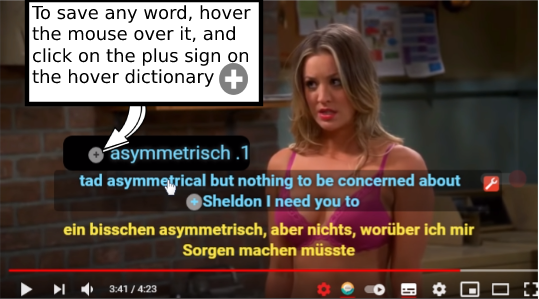
Click on the plus signs next to sentences to save sentences.

To save any word, hover the mouse over it and click on the plus sign on the hover dictionary.
How to practice and learn the phrases that we watch in a movie?
Tip no.1: Every night before bed, review and practice your exported words. You can recite them out loud with different intonations.
Tip no.2: Make scenarios in your head that you can use those phrases in them. Be as dramatic as possible. Imagine yourself as the movie characters and play those phrases.
Tip no.3: Look for situations that you can use the phrases you learned on your daily basis. When you’re in the middle of a conversation, listen and see which part of the conversation is suitable for the phrases you learned.
Use your own creativity and make other exercises that can help you learn your target language with the Netflix Chrome extension.
This Netflix Google Chrome extension has so many options; so the variety of the practices that you can make is huge.
Other learning Tutorials
This Netflix Chrome extension doesn’t need any tutorials, because it is so easy to work with. Just watch the 2 minutes tutorial on this link and you’ll be fine.
But just in case:
Check out other tutorials on this website that teach you How to use the Netflix Chrome extension’s beneficial features.
Also, check this website to get amazing tips about learning languages.