Learn Korean with Korean phonetics on the Netflix extension
There are so many interesting Korean dramas out there, that made a lot of people learn Korean just by watching them. Many Korean learners rely on Korean drama and K-pop more than they rely on books and language classes. So if you’re a Korean learner, I recommend learning Korean by Watching Netflix and YouTube; because they are the source of all K-dramas and K-pop videos. But Netflix and YouTube alone don’t help you a lot, unless you use language learning with Netflix and YouTube Google Chrome extension. Because with features like Korean phonetics on the Netflix extension that it gives you, you can make your Korean learning journey so much easier. Especially if you’re a beginner.
This language learning with Netflix and YouTube Google Chrome extension has so many more features. But Korean phonetics are only available on this Chrome extension and you can’t find them on any other program. To know what are Korean phonetics and why everyone is talking about it, keep reading.
Why we have to learn Korean with phonetics on the Google Chrome extension?
Korean phonetics writes Korean words and sentences in the English alphabet. This way you can read Korean subtitles and know the right pronunciation of every word.
Korean is one of the hardest languages. Especially for English speakers. The intonations and the pronunciation are a whole different game with English pronunciation and intonation. But the hardest part is the alphabet.
As you know all the language learners have to learn the alphabet first then everything else such as words, grammar, and other language skills. Since the Korean alphabet is really hard, it takes so much time to learn it, and it delays the time to actually start learning the useful part of the Korean language. So some people just give up learning Korean when they’re in the middle of learning the Korean alphabet.
With Korean phonetics on the Netflix extension, you can work on your speaking and listening skills and learn other things while learning the alphabet. Korean phonetics on the Netflix extension, write Korean words in the Korean subtitle in the English alphabet.
This Chrome extension also has the dual subtitle’s feature. So you can choose your mother language subtitle as the lower subtitle and choose the Korean phonetics subtitle for the upper subtitle. This way you can understand what the characters are saying and also know the right pronunciation.
How to use Korean phonetics on the Netflix extension?
If you want to use phonetics for a video, it has to have a Korean subtitle on its own.
How to change the upper subtitle
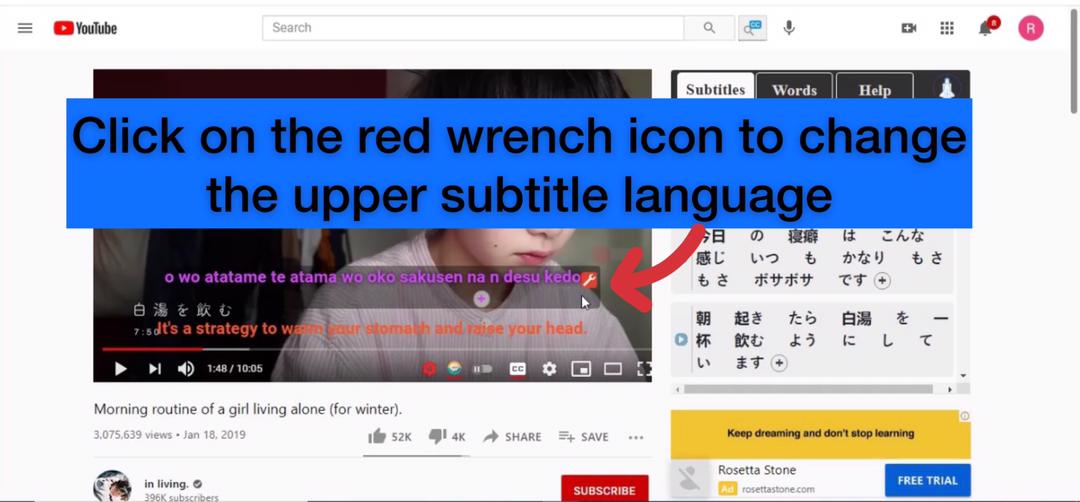
Click on the setting button to see all the feature
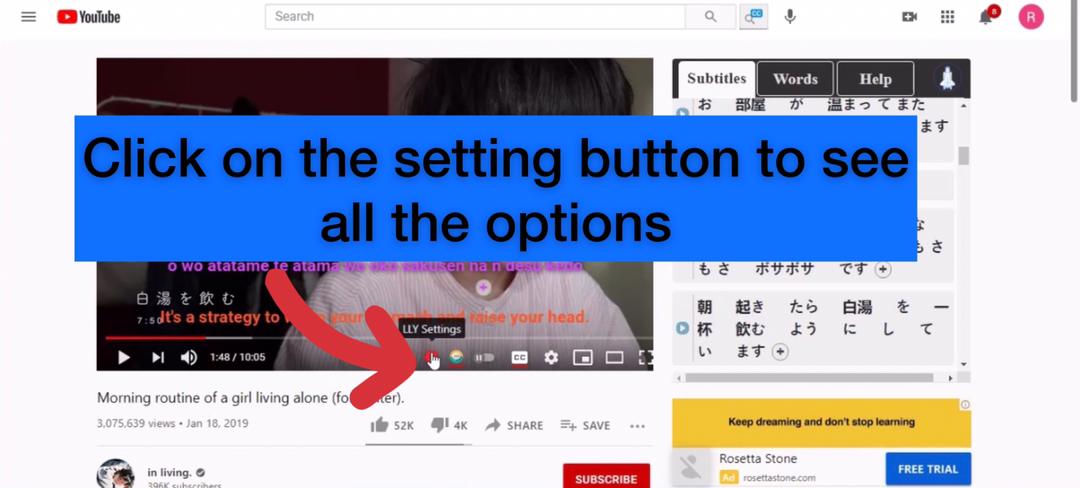
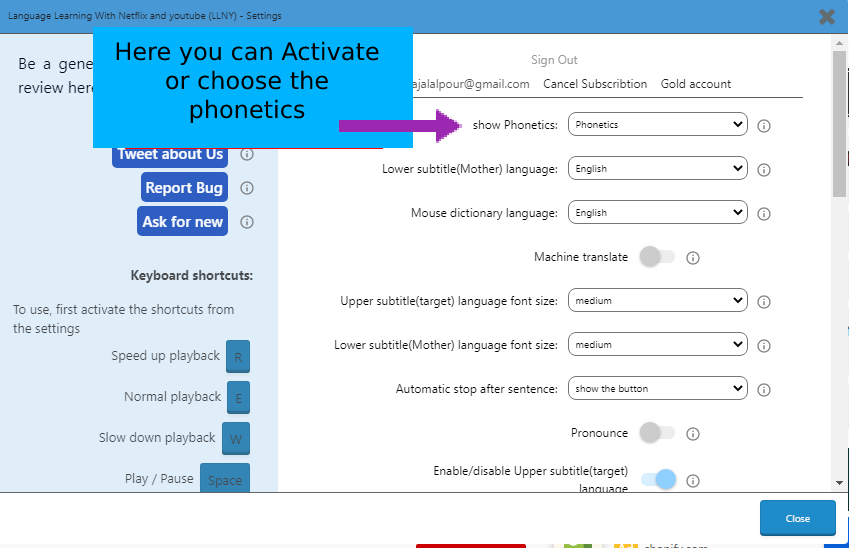
Here you can choose the Chinese phonetics on the Netflix extension.
Language learning with Netflix and YouTube Google Chrome extension other features
Since this was a short tutorial post about Korean phonetics on the Netflix extension, we didn’t have the opportunity to talk about this Google Chromes other features. features like:
- Dual subtitle: Have two subtitles on the screen. Choose one subtitle in your mother language, and the other one can be your target language.
- Hover dictionary: Hover the mouse over any word to get its meaning right away.
- Save words and sentences: Click on words and sentences to save them so you can review them later.
- Export and download your saved words and sentences: For offline review.
These are the most popular features. It has more than 20 options that can help you on your language learning journey. Read this page to get familiar with them.
Also if you wanted any tutorials for anything visit. extension.appforlanguage.com