The best language learning apps in 2025
As a language learner, curiosity is one of the most common things that happen to you. Where do I start? How do I start? What is the best way to learn a language? Which are the best online courses? What are the best language learning apps that can help me learn my target language? Can you learn a language at home with these apps?
When you start and keep going in language learning, you’ll get the answer to most of those questions by experience. But we’re going to tell you the answer to the last question, so you can save a lot of time and energy.
Which are the best free language learning apps?
One of the features of living in 2022 is that there are too many facilities and options for everything. Which could be both a good thing and a bad thing. The bad thing about it is that you get confused about which one to choose.
Choosing the right app and the right way to learn a language is very important. If you choose the wrong way, you might get tired and give up in the middle of the way.
To choose the right app you have to know their way of working, strategy, and other details. Also, you have to know the good and bad points about each app. Which you will know in a few seconds.
So keep reading to know the best free language learning apps.
Can you really learn a language from an app?
By learning a new language, we earn a new personality. I personally don’t think that you can earn a new personality just by using an app. But choosing the right language learning app could be a big help.
Remember that if you want to really become fluent don’t only rely on an app. Try other ways like movies, series, talking to natives, and other stuff too.
But having a good language learning app that teaches us our target language, can make our language learning, easier and faster.
So choose one or maybe a couple of the following apps that suit your desire the most, and follow along with it.
Top five language learning apps in 2025
Here are the top seven language learning apps. Read this information and decide which one you like.
Duolingo
Right now, Duolingo is the most popular language-learning app. Duolingo has a skill tree of lessons that uses listening exercises, flashcards, and multiple-choice questions to teach you new words, phrases, and sentences. graphic of the app and the animations are interesting which makes working with it, fun and exciting.
Duolingo has several ways to keep you motivated to keep going. One of its ways is strikes. It keeps your strikes within weekly, monthly or more periods of time and shows them to you. For example, it shows you that you have been taking lessons 3 days in a row, and it sends you messages or notifications to make it more.
Each lesson you take has a “Crown Level” associated with it. When you complete a lesson, you win a Crown, and the kind of tests and lessons you see will get harder. You can choose to go deeper into skills or continue to new skills to learn new content. You also can win up to 5 crowns per skill!
Duolingo can totally help you become fluent. But you need to practice communication in your target language to make fluency happen. So make sure to work on your speaking and listening skills on the side.
Have in mind that Duolingo is limited and not enough for fluency. Duolingo can get you to somewhere around A2 or B1 which is just enough to be something at your target language, but not enough to talk to native people and be comfortable.
Memrise
Memrise teaches vocabulary in the most fun way possible. This app teaches vocabulary by showing you words, characters, or concepts, depending on what subject you’re studying, and then quizzing you on them. The app uses both text and audio for its lessons.
Memrise relies on two things for teaching, memes, and gamification. The words that you learn in courses come with a funny image or a meme that makes you memorize the vocabulary playfully. The interesting thing is that memes are created by the community and everyone can add their own memes.
You can compete with other learners for points and see your results on a course.
Memrise absorbs you as time goes by and creates an algorithm to remind you when you need to review, and sends you notifications.
But Memrise mainly focuses on vocabulary. To learn a language, you need to learn grammar, speaking skills, communication, and other things that Memrise doesn’t cover. So Memrise alone is not enough.
Lingualift
Lingualift is a more serious and educational app for serious language learners who want an app that covers all aspects of a language. Ligualift gives real language learning programs with the guidance of real tutors.
The thing about this app that makes it special is its teachers and tutors. They are available to answer any questions that might pump up in your head. They will even assign and correct homework for those who are interested.
Lingualift is amazing for beginner or intermediate level, with simple and easy grammar and vocabulary lessons, & script learning tools. It also talks about the cultural aspects of a language, which most language learning apps don’t.
When you subscribe, you get their special learning book which is free on their homepage. You also get a study plan called “A Road Map to Fluency” which is customized for you. They customize the road map by your answers to some questions. These questions are about your goals, daily schedules, and your study habits. You tell all these to the tutors, and then they make a study plan for you. The road map shows you stuff like effective study routines, other sources that are good to have on aside, and what level in your language learning to use each resource.
Every course is about 10 to 15 minutes short. So the lessons won’t get boring.
So if Lingualift is interesting to you and suits your desire, check their website: www.lingualift.com
Mindsnacks
Mindsnack is one of the language learning apps that teach languages using games. This app thinks that learning vocabulary with textbooks and flashcards is really boring, so it teaches all of its 13 languages with around 10 tiny games that cover grammar, vocabulary, and listening skills.
The design of Mindsnacks is so fun and interesting that even if you do master a skill, you still want to go back and play the games.
Mindsnaks is free to download, and you get access to more games and lessons as you go forward. If you are interested in this app, download the app from everywhere that it’s available.
HiNative
With HiNative, you can communicate with native speakers and you don’t have to make schedules or all this boring stuff.
The purpose of HiNative was to bring all the natives and language learners together to help each other learn a language.
In HiNative, you can ask any questions about vocabulary, grammar, translations, culture, and other stuff from native people. Don’t be ashamed to ask any questions.
You as a native can also answer questions to people who are learning your mother language.
This app has a desktop version and it’s totally free.
But remember that HiNative has nothing else besides communicating with natives. So you can’t use it as your main source to learn a language and you should have it on aside next to your other sources.
Language learning with Netflix and YouTube Google Chrome extension
The most complete app that you read about earlier is called language learning with Netflix and YouTube Google Chrome extension. I’m sure you have heard about it because this language learning Google Chrome extension is the hottest topic in language learning communities nowadays.
You can choose one of the apps you read about earlier and download and add this Google Chrome extension. It will be enough to master a language.
The language learning with Netflix and YouTube Google Chrome extension gives your Netflix and YouTube language learning features and options, that make language learning so easier and faster by just watching movies.
Language learning with YouTube
You know that YouTube is one of the platforms that you can rely on if you want to learn a language. There is so much content on YouTube that can help you learn your target language in so many different ways. You can find videos that are educational and teach vocabulary and the grammar of your target language. Also, you can watch music videos, TV shows, vlogs, and tutorial videos in your target language. That’s why language learning with YouTube is one of the most popular ways of language learning nowadays.
Language learning with Netflix
Also, Language learning with Netflix is getting more and more popular every day. The best way and the easiest way to learn a language is by watching movies and series in that language. Because in movies and TV series you can find all kinds of words, sentences, and phrases, dialogues for different situations, different accents, pronunciations, and the culture of your target language.
All of those apps you just read about are incomplete or need other strategies and learning methods next to them. There is one app that is the most perfect language learning tool and it’s enough for language learning.
Language learning with Netflix and YouTube extension options and features
Dual subtitle
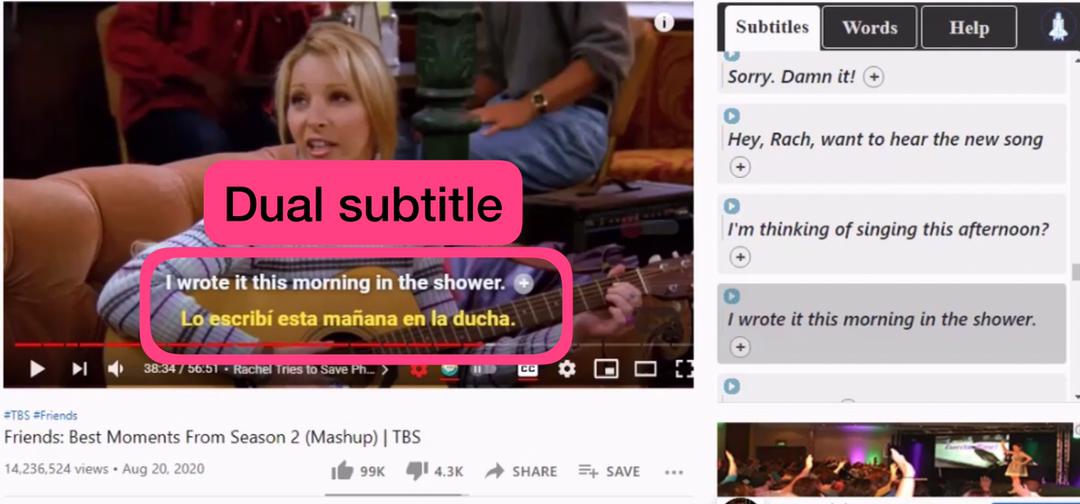
With this language learning Google Chrome extension, you can have two subtitles on the screen at the same time. You can also choose the language of both subtitles. The upper subtitle could be your target language’s subtitle. So you can look at it and see the writing and the right pronunciation of words and sentences. The lower subtitle could be your mother language’s subtitle, so you can see the meaning of words and sentences.
Hover dictionary
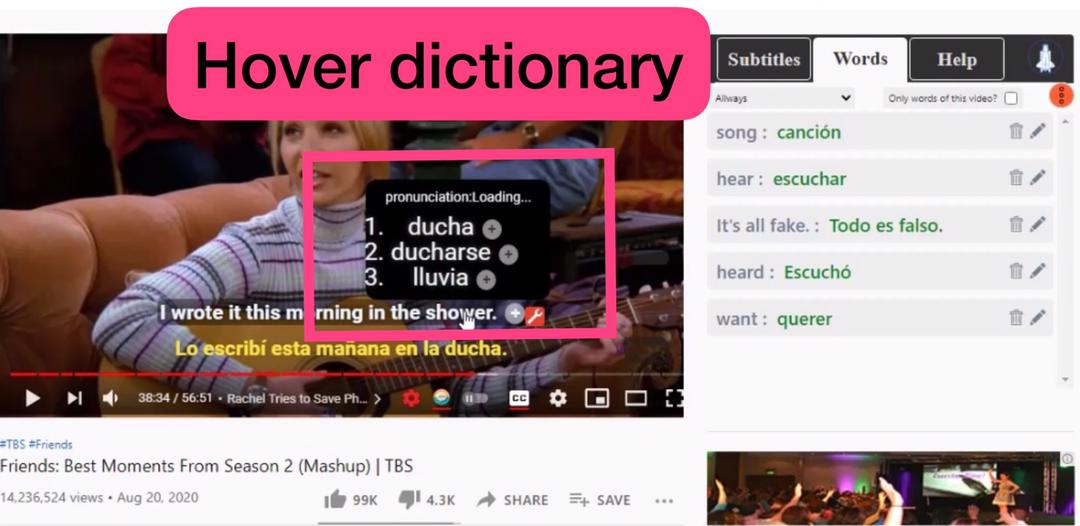
It always sucks to stop the movie or any video that you’re watching to go and search a word’s meaning that you just saw in the subtitles. But with language learning with Netflix and YouTube Google Chrome extension, it doesn’t have to suck.
With this Chrome extension every time you wonder about a word’s meaning, you can just hover the mouse over it in the subtitles and it gives you the meaning and even the pronunciation right away.
Save words and sentences
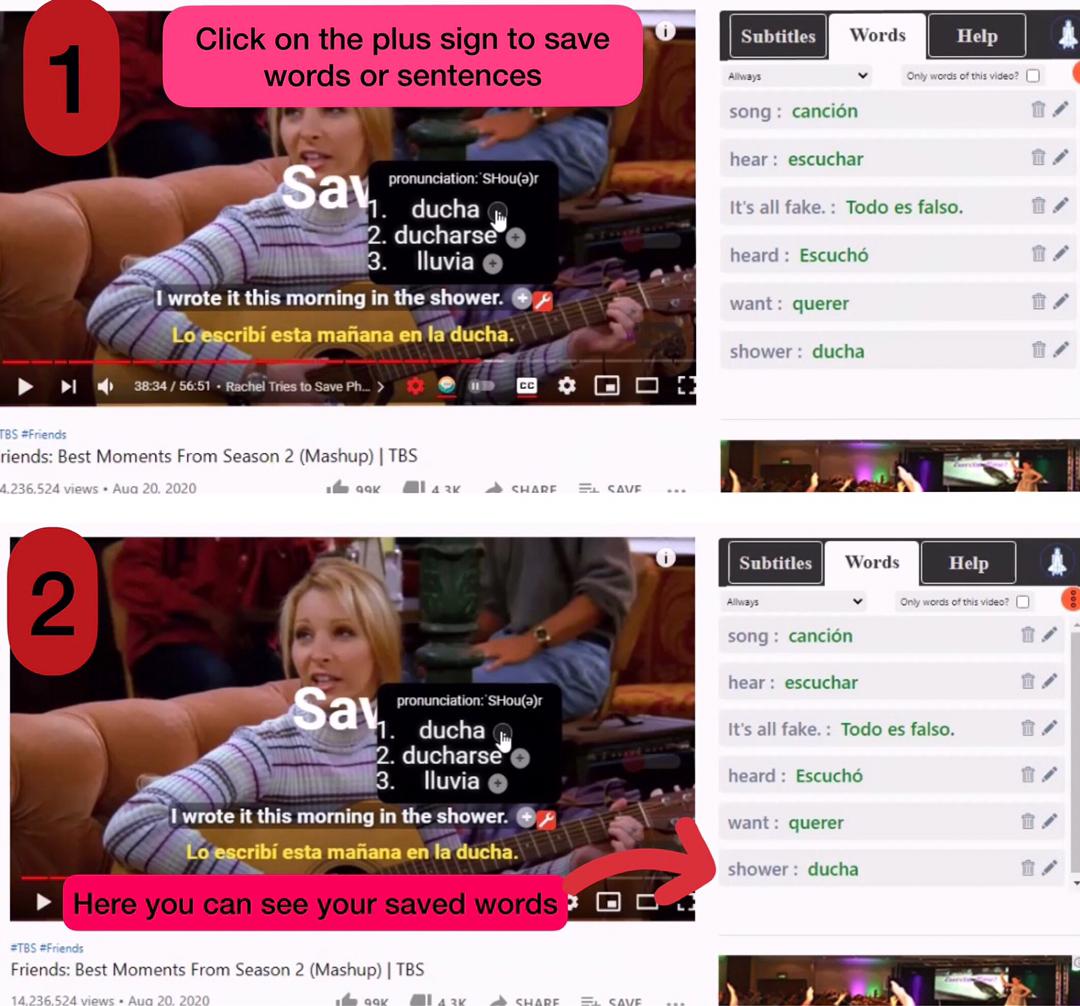
Save words and sentences that are worthy to be saved for later review.
To save words click on the plus sign on the hover dictionary and to save sentences, click on the plus sign at the end of them.
They will be saved in the sidebar.
Download words and sentences
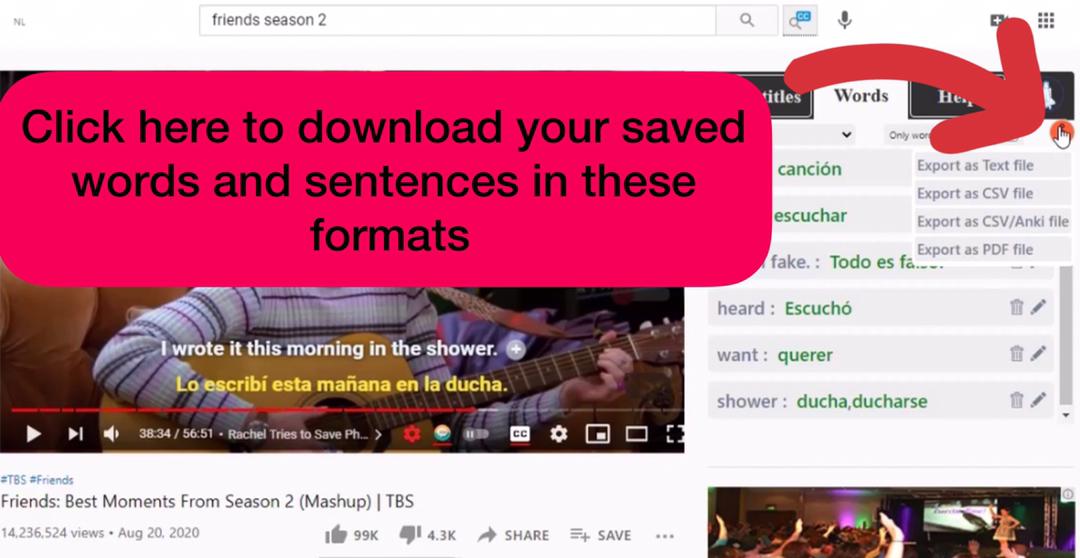
You can download your saved words and sentences for offline review. The four formats are available to export:
- Text file
- CSV/Anki flashcard file
- CSV file
- PDF file
The auto-pause button
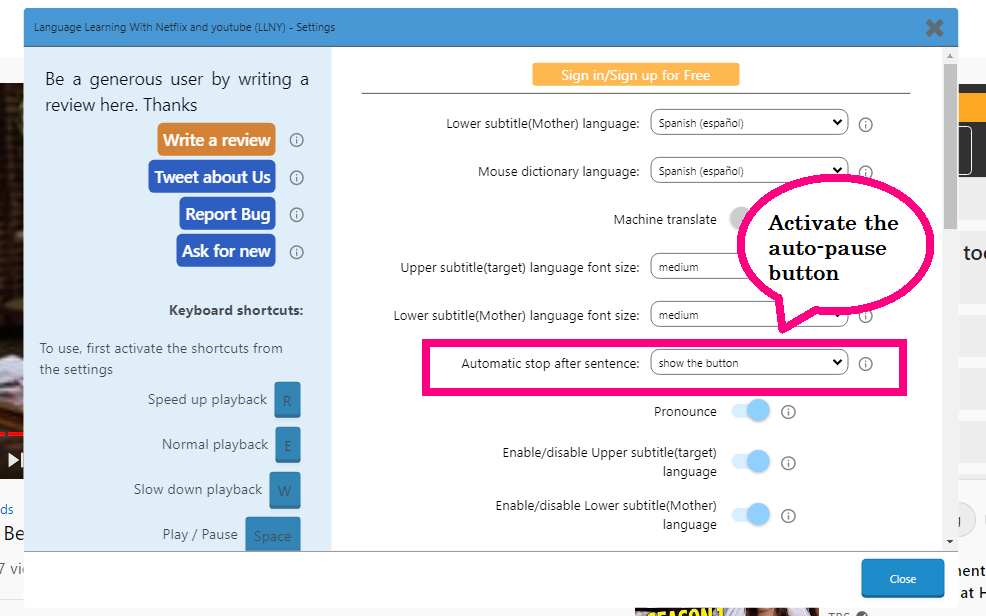
Activate the auto-pause button from the setting sections. The auto pause button has 2 active modes:
- The video pauses after every sentence and will start playing again when you press the space key.
- The video pause after every sentence and will start playing again after a few second. You can choose the pausing time in the setting section.
Design your screen
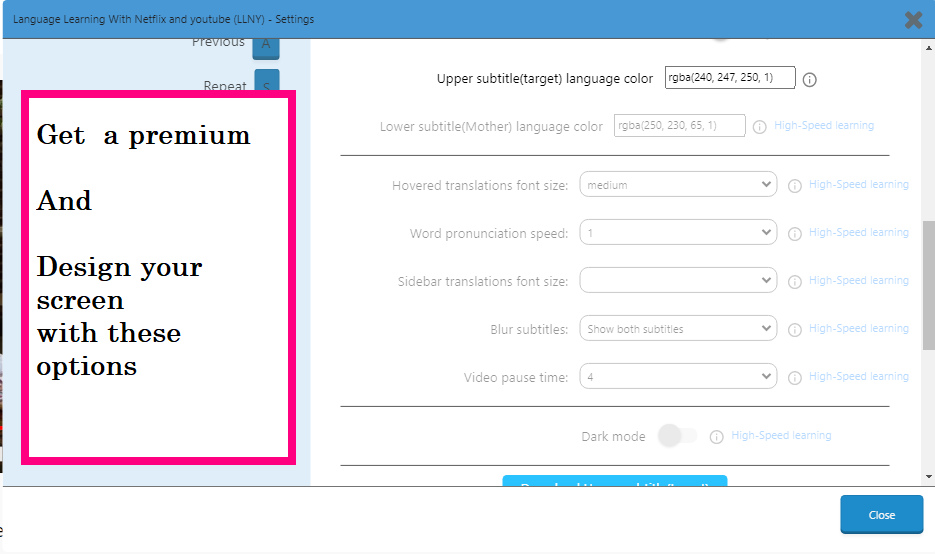
You can choose the subtitle’s font, size, color, background, and place. You can also choose all these for the hover dictionary.
Keyboard shortcuts
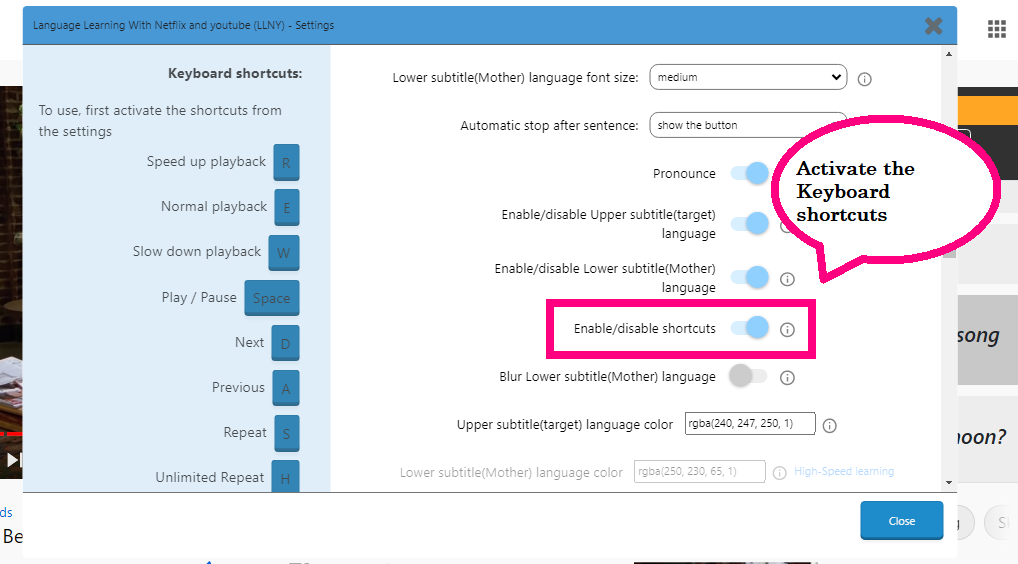
Control whatever you want to happen on your screen with the keyboard shortcuts. You have to activate keyboard shortcuts from the settings if you want to use them.
Here are some of the keyboard shortcuts:
- R key to Speed up playback
- E key to Normal playback
- W key to Slow down playback
- Press Space to stop/play the movie
- D key to show the Next part
- A key to show the Previous part
Language learning with Netflix price
This Google Chrome extension is totally free to download and add to your Google Chrome. The LLNY Google Chrome extensions and also language learning with Amazon prime Google Chrome extension are free to download and add.
But if you get premium, you can get more useful features to learn languages.
Let’s see what features are for free and what features are for premium users.
These are all some of the features that you can use for free:
- Have dual subtitles for free. Choosing the languages of both subtitles
- The hover dictionary and choosing its language
- Choosing both subtitles font size
- The auto-pause button
- Enable/disable the subtitles
- Enable/disable the keyboard shortcuts
- Choosing the upper subtitle(target) language color
- Saving words and sentences (with a daily limit)
- Downloading saved words and sentences as a text file
- Downloading the upper and the lower subtitle
- Keyboard shortcuts
- Click on words and sentences and get their translation (with a daily limit)
These were some of the extension’s free options. You’ll see more of them when you actually start working with it.
These are all some of the features that you’ll have when you get premium:
- Choosing the lower subtitle (Mother) language color
- Save and learn unlimited vocabulary and sentences
- The hover dictionary font size
- You can click on any word or sentence and it will translate it for you. There is no limit. So you can click on as many words and sentences as you want.
- Choose the pronunciation’s speed
- Choose the sidebar translations font size
- Blur the upper or the lower subtitle, or both
- Choose the pausing time for the auto-pause button
- Put the extension on the dark mode
- Choose a background and its color for subtitles
- Export your saved words as CSV, Anki, and a PDF file
Amazon Prime Google Chrome extension
Amazon Prime has movies and series that are popular among language learners. So most language learners use Amazon Prime too. That’s why there is a language learning Google Chrome extension for Amazon Prime. This language learning Google Chrome extension has the same features and options as language learning with Netflix and YouTube Google Chrome extension.
So click here to download language learning with the Amazon Prime Google Chrome extension.
Is there a Chrome extension for Language learning with Android and IOS?
The language learning Chrome extensions are getting more and more famous and popular. That’s why the requests from people for different versions and more options are getting more. The creators are working hard to give you other versions of language learning Google Chrome extensions, that you have been asking for. The Chrome extension that is on the way are:
- IOS language learning Google Chrome extension
- Android language learning Google Chrome extension
- Firefox language learning extension
- Safari language learning extension
So stay tuned and updated for these amazing and useful extensions.
What app are you using to learn a language?
Have you ever used an app to learn a language? Do you know other apps that help in language learning? If you do, do other language learners a favor and tell them about your experience, so they can learn from your experiences and reach their goal.
Remember that all these apps are just here to help you. But none of them can help you as much as yourself. So have persistence and keep practicing every day. Find the right tools so you can keep being motivated.
If you want other guidance for your language learning, check learnonelanguage.com for updated tips.
If you need easy tutorials on how to get to work with language learning Chrome extension, check extension.appforlangauge.com
For the reason that thhe admin off this web page is working, no doubt vrry rapidly itt
will be famous, due too its quality contents.