Don’t waste time on random words —Core Words shows you the most important vocabulary from the video, matched to your English level.
Powered by trusted Cambridge vocabulary lists, this feature helps you focus on words that matter most for your progress.
👣 How to use Core Words:
- While watching a video, click the Core Words icon in the features menu
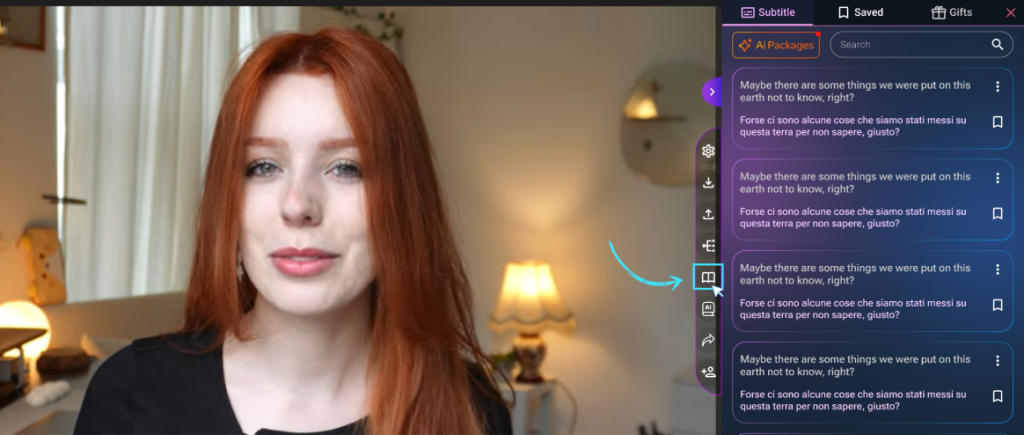
See how Core Words extracts key vocabulary from your Netflix videos. - Wait a few seconds while your custom list is generated
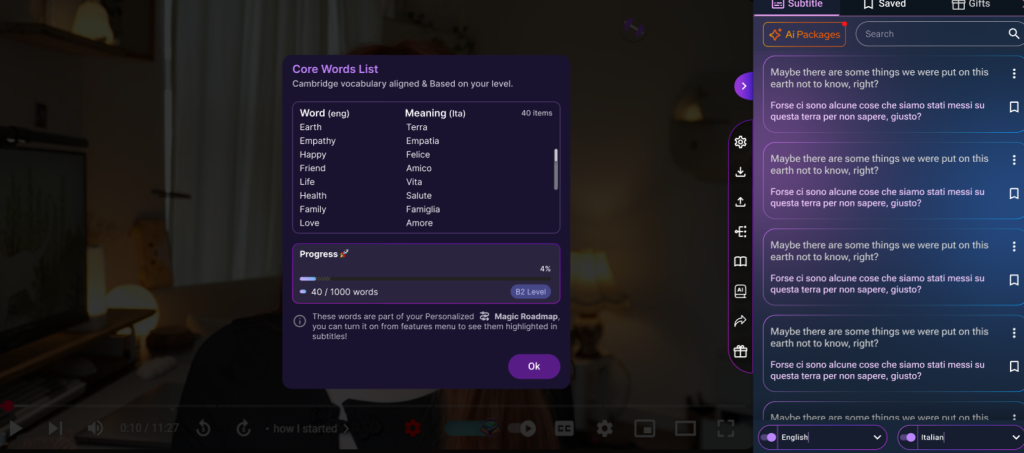
- A popup will appear showing:
- A list of important English words from the video
- A progress bar showing how many you’ve learned
🔤 Note: Core Words currently supports English learners only — make sure your learning language is set to English.
🧠 Want to see these words while watching?
Turn on Magic Roadmap from the features menu to see your Core Words color-coded right inside the subtitles — making them easier to recognize and remember in real context.
Learn smarter, level up faster —
Core Words keeps your vocabulary learning on track.