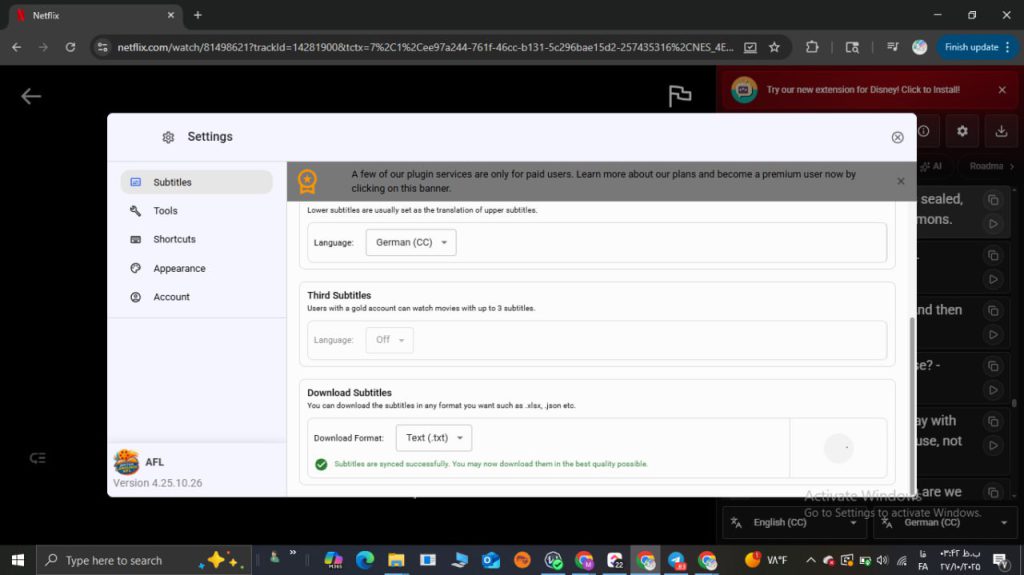
Want to download Netflix subtitles for study? Same here. But rules matter, and shortcuts break fast. This quick, friendly guide shows what “download” really means, why raw ripping is risky, and how to turn lines into real speaking skills with FunFluen.
What “download” really means
When people say they want subs, they usually want text they can review later. However, Netflix uses DRM, regions, and soft vs. hard subs. Therefore, a safe approach often means exporting the lines you already can view. In short, think study copy, not piracy.
Legal notes & safe methods
Please respect copyright and the Terms of Service. For private learning, keep files to yourself and never repost. Thus, if you download Netflix subtitles, store them locally and use them only for practice. Otherwise, your approach can cross a line fast.
Step-by-step: the smarter export (FunFluen)
-
Open a title and enable dual or even tri-subtitles.
-
Hover words, save tricky lines, and build a mini list.
-
Export to Anki/CSV/HTML/Text. Consequently, your download Netflix subtitles flow is clean, fast, and organized. Need another scene? Just repeat the download Netflix subtitles steps.
Turn subs into active practice
After you download Netflix subtitles, don’t stop at reading. Instead, run Fluency Gym: guess in Reading, catch lines in Listening, then speak in Speaking and compare with the actor. Moreover, AI Coach fixes grammar and pronunciation. Plus, AI Buddy chats in spoiler or no-spoiler mode. Meanwhile, AI Mind Maps link idioms, phrasal verbs, and collocations. Therefore, your routine becomes real progress.
Troubleshooting + quick FAQs
-
Out of sync? Adjust timing and positions.
-
Too busy on screen? Resize, recolor, or blur.
-
Missing a language? Upload a second subtitle or use machine translation.
-
Is it legal? For private study, yes—still, never share files publicly.
-
Can I export to Anki? Yes. Thus, your download Netflix subtitles becomes spaced repetition, not clutter.
Try the study-ready way
If you still want to download Netflix subtitles, do it the smart way. Export, review, and practice—then actually speak. Consequently, the files you save today turn into tomorrow’s fluency.
About FunFluen
FunFluen makes study simple. You get dual/tri-subs, a hover dictionary, one-click exports (Anki/CSV), and the Fluency Gym for reading, listening, and speaking drills. Furthermore, AI Coach, AI Buddy, and AI Mind Maps keep practice focused and fun—so your time on screen becomes real, measurable progress.