Introduction: Why Is Fast Speech a Challenge?
Struggling to catch every word in fast-paced movie scenes? You’re not alone. Whether you’re watching your favorite Netflix series or trying to follow a documentary, fast speech can feel like an impenetrable wall. You think you’ve finally caught a phrase, but then the dialogue rushes past, leaving you lost.
Fast-paced dialogue can be overwhelming for language learners, especially when native speakers seem to blur words together. This can make you feel like you’re not progressing, even after hours of practice. Luckily, there’s a solution that makes mastering native-level listening easier: Smart Pause and Slow Playback.
These tools are game-changers for language learners. They work together to help you catch every word, absorb the meaning, and even practice pronunciation. Let’s dive into how they can make listening practice more effective and enjoyable.Even small adjustments, like slowing down playback, can make a big difference when you’re trying to improve listening skills.
The Problem: Fast Speech & Missed Words
Ever watched a Netflix show and felt like the dialogue was one long, rapid sentence? You’re not alone. Native speakers often link words, speak quickly, and use slang that makes it challenging to follow. Even if you’ve studied the language for years, understanding fast speech can still feel daunting.
Many learners share common frustrations when watching movies or series:
-
Missing key phrases.
-
Misinterpreting words due to unclear pronunciation.
-
Feeling lost despite knowing the vocabulary.
-
Constantly rewinding to catch missed parts.
Imagine this: You’re watching a gripping crime drama, and a character delivers a crucial line. You think, “Wait, what did they say?” You rewind, but still can’t make sense of it. You feel frustrated and discouraged. Fast-paced dialogues can make you doubt your progress.
But here’s the good news: With the Learning Language with Netflix extension, you can finally overcome this challenge using Smart Pause and Slow Playback.A little extra time and focus can go a long way in helping you improve listening skills naturally.
What Is Smart Pause?
Smart Pause is a revolutionary tool that makes listening practice more manageable. It automatically pauses after each subtitle line, giving you a moment to absorb the dialogue before moving on.
How It Works:
-
Install the Learning Language with Netflix extension.
-
Turn on Smart Pause in the settings.
-
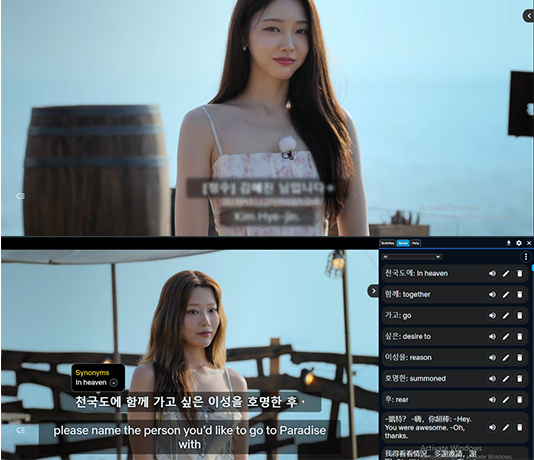
As the movie plays, the extension pauses after each subtitle line, allowing you to read and comprehend without feeling rushed.
Why It Works:
Our brains process new languages differently from our native tongue. When listening to fast-paced dialogue, it’s easy to miss subtle sounds or word connections. Smart Pause gives your brain that extra second to catch up and understand.
Looking to improve listening skills? Try slowing down fast-paced dialogues to catch every word.
Example:
Imagine watching a comedy show where the characters speak rapidly and crack jokes. Instead of pausing manually and disrupting your flow, Smart Pause does it for you. You can take a moment to understand the punchline, repeat the phrase, and even practice saying it yourself.
The Power of Slow Playback
Sometimes, even Smart Pause isn’t enough. That’s where Slow Playback comes in. This feature reduces the playback speed without distorting the audio, making it easier to catch every word.
How It Helps:
-
You can set playback to 0.75x or even 0.5x speed.
-
The audio remains clear and natural, unlike the robotic sound you might expect.
-
You have more time to process tricky accents or complex sentences.
Example:
Imagine a drama scene where emotions run high, and the characters are speaking rapidly. You slow down the playback just enough to hear the details, like the rise and fall of intonation, while still keeping the flow of the dialogue.
Don’t worry if you miss a word; using Smart Pause gives you a second chance to improve listening skills without pressure.
Combining Smart Pause & Slow Playback for Maximum Effect
One tool alone might not always do the trick. Combining Smart Pause and Slow Playback gives you the ultimate listening practice experience.
How to Do It:
-
Start with Slow Playback when you first encounter a challenging scene.
-
Turn on Smart Pause to break down each line.
-
Repeat the dialogue after listening to practice pronunciation.
-
Gradually increase the speed as you get more comfortable.
User Tip:
Use this combo when watching dialogue-heavy scenes, like debates or intense conversations. Repeat the scene multiple times at different speeds. You’ll notice how your comprehension improves with each replay.
Real-Life Applications & User Benefits
Let’s talk about Lisa, an advanced English learner who loves watching crime series on Netflix. Despite her skills, she often felt defeated when characters spoke too fast. After using Smart Pause and Slow Playback, her experience changed completely.
What Improved for Lisa:
-
She caught subtle slang and idioms that she used to miss.
-
Her pronunciation got better because she could repeat lines without rushing.
-
She gained confidence in understanding native-level conversations.
These tools aren’t just helpful—they’re essential. You’ll start to feel more confident when watching shows or even in real conversations. Instead of guessing, you’ll know exactly what was said.
How to Get Started with Learning Language with Netflix Extension
Ready to upgrade your listening skills? Follow these quick steps:
-
Install the Learning Language with Netflix extension from the Chrome Web Store.
-
Open a Netflix show or movie.
-
Enable Smart Pause and Slow Playback in the settings.
-
Choose a challenging scene and practice!
CTA:
Don’t just watch—learn! Experience the difference Smart Pause and Slow Playback make in your language journey.
Conclusion: Take Control of Your Listening Skills
Next time you’re struggling to catch every word in a fast-paced dialogue, remember: Smart Pause and Slow Playback are your secret weapons. They help break down complex speech into manageable chunks and let you repeat tricky lines without stress.
Try the Learning Language with Netflix extension today! Start mastering native-level listening and never miss a word again.
Why AppForLanguage Is Your Go-To Tool
Learning a new language shouldn’t be a struggle. With AppForLanguage, you get tools that make listening practice enjoyable and effective. From Smart Pause to Slow Playback, our extension turns every movie session into a productive language lesson. Install it now and see the difference for yourself!