Want to learn faster while you watch? Great. With netflix dual subtitles, your show becomes a mini lesson. You see meaning and form together. So, your brain connects the dots. And because it’s all in context, new words actually stick.
Why this works (and feels easy)
Two lines beat one. You view the original line and your language at the same time. Therefore, you compare, confirm, and move on quickly. You also spot collocations, idioms, and tone. Moreover, you pause after each sentence, think for a second, and then continue. With netflix dual subtitles, progress feels smooth, not stressful.
What you need (fast checklist)
-
Funfluen extension on Chrome or Edge.
-
A Netflix title that includes subtitles.
-
Optional: Funfluen app for Disney+ and YouTube when you’re on the go.
That’s it. You’re set in minutes.
Step-by-step: turn it on (desktop)
-
Install Funfluen. Then pin the icon.
-
Open Netflix and play any episode or movie.
-
Open the Funfluen sidebar. Next, enable the first subtitle (original).
-
Enable the second subtitle (your language). With netflix dual subtitles, you can compare lines instantly.
-
Prefer more context? Turn on tri-subs when needed.
-
Adjust position, font size, and colors. Also, set auto-pause per sentence. That small pause helps you think, speak, and lock in meaning.
Learn smarter, not harder
Start with short scenes. Then shadow one clean line. After that, replay it once. Use the hover dictionary for quick meanings. Save tricky words or full sentences. Later, export to Anki or CSV. Because the cycle is simple, you’ll repeat it daily. And with netflix dual subtitles, you’ll notice real gains in listening and speaking.
Add AI for real momentum
-
AI Coach: Get gentle corrections on grammar and pronunciation. It adapts to your goals and level.
-
AI Buddy: Chat like with a friend, without pressure. Choose spoiler-safe or spoiler-full mode.
-
AI Mind Maps: See how words connect. Idioms, collocations, and grammar come together visually.
Together, these tools keep you consistent. Consequently, practice turns into progress.
Fix subtitle issues fast (common problems)
Ads or buffering threw things off? No worries. Tap the delay/advance buttons to nudge timing. In seconds, netflix dual subtitles are back in sync. No official subtitles for your target language? Use machine translation as a fallback. Keyboard shortcuts too busy? Toggle them off or customize. Meanwhile, try blur mode to force listening first, then reveal the text.
Best settings for clear gains
-
Keep auto-pause on. Even a 1–2 second delay helps.
-
Reduce eye travel. Move the first and second lines closer.
-
Use phonetics for Chinese, Japanese, and Korean.
-
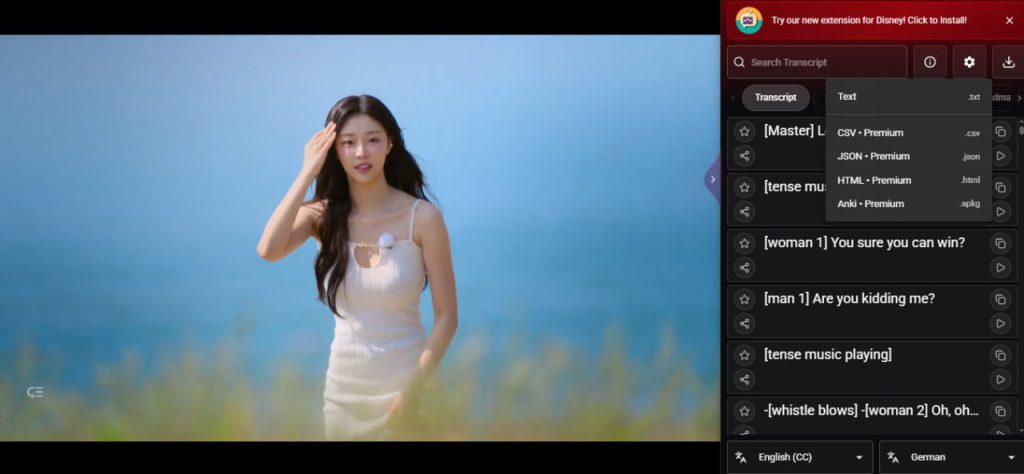
Open the sidebar transcript. Search, jump to a line, copy, or share.
-
Keep colors high-contrast but soft on the eyes. Your focus matters.
A simple daily routine (5–10 minutes)
Pick one short scene. Turn on netflix dual subtitles. Shadow one line out loud. Save five phrases you don’t fully own yet. Export and review once. Finally, celebrate the tiny win. Because it’s small, you’ll do it tomorrow too.
Quick FAQ
Can I export subtitles and saved items? Yes. Export to Anki, CSV, Excel, HTML, JSON, or Text.
How do I learn speaking, not just reading? Use auto-pause, then shadow the actor. Next, switch to Fluency Gym’s Speaking mode for guided practice.
Meet Funfluen (30 seconds)
Funfluen turns streaming into real practice. You get Fluency Gym for reading, listening, and speaking drills. You also get AI Coach for feedback, AI Buddy for conversation, and AI Mind Maps for clarity. Plus, you can save, export, and review with ease. Install Funfluen, press play, and grow your fluency—one scene at a time