
Let’s be real. Sitting down with a grammar book after a long day? Not exactly exciting. Memorizing verb conjugations? Ugh. Now imagine this instead: you’re curled up watching your favorite Netflix series, laughing at jokes, crying at cliffhangers… and learning a new language without even realizing it. Sounds like a dream, right? You can use Netflix subtitle learning tool.
Well, thanks to a bunch of smart Chrome extensions, that dream is totally real. These tools turn Netflix into a full-blown classroom—and not the boring kind. In this guide, we’ll show you the best Chrome extensions for language learners, especially one Netflix subtitle learning tool that’s changing the game. Whether you’re a student, a curious binge-watcher, or someone who’s tired of Duolingo’s owl guilt-trips, this one’s for you.
🌐 What Are Chrome Extensions for Language Learning?
Let’s start simple. Chrome extensions are tiny tools you add to your browser. And for language learners, they’re magic. Why? Because they help you learn while doing what you already love—watching Netflix, browsing the web, and chilling online.
These extensions can:
-
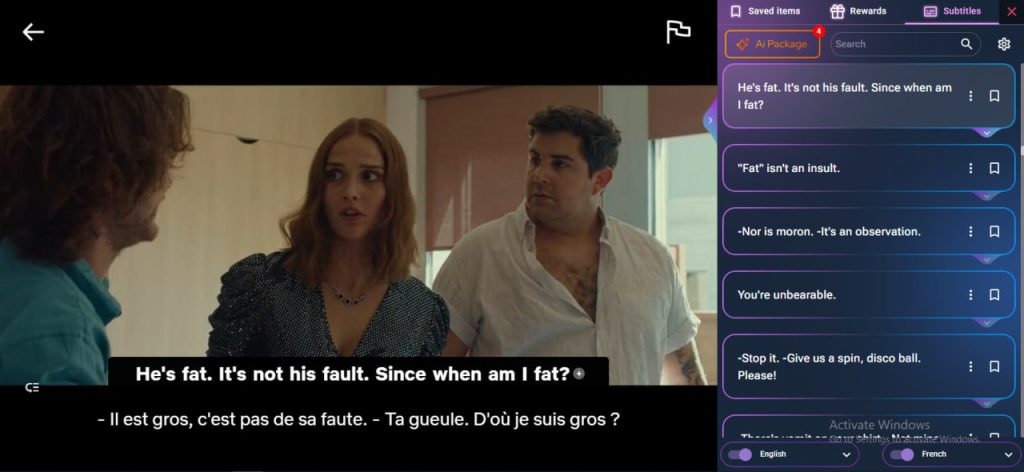
Show subtitles in two languages at once
-
Instantly translate words with a click
-
Highlight tricky vocabulary
-
Offer grammar tips on the spot
-
Even quiz you after an episode
In short, they let you learn a language while watching Netflix—naturally, without interrupting your flow.
🔥 Best Chrome Extensions for Language Learners
Here’s a look at the best of the best. These are the top tools for turning Netflix into your language playground.
1. AppForLanguage – Best for Immersive Learning with Netflix
Let’s kick it off with the real MVP. AppForLanguage is a smart, fun, and super effective Netflix subtitle learning tool that brings language learning right into your binge-watching time. It’s like having a tutor sitting beside you—without the awkwardness.
🎯 So, what does it do?
-
Dual Subtitles: See subtitles in both your native and target language at the same time.
-
Interactive Translation: Click on any word to get its meaning, pronunciation, and examples.
-
Smart Pause: The video auto-pauses after each line of dialogue—so you don’t miss a thing.
-
Fluency Gym: Mini-exercises and quick drills based on what you just watched.
-
AI-Powered Grammar Help: Spot mistakes, learn why they happen, and get better.
-
Word Roadmap: Keep track of new words and review them later like a pro.
Basically, this tool does it all. If you’re wondering what is the best Chrome extension for students who love Netflix? This is it. AppForLanguage takes your streaming habits and turns them into serious language learning.
💡 Pro Tip: Use the “Mindmap” feature to see how words are connected. It’s visual, fun, and seriously helpful.
2. Language Reactor
This is another solid choice. It gives you dual subtitles, clickable words, and lets you slow down playback if you need to hear things clearly. You can even export vocabulary lists. Sounds great, right? Well, kind of.
Some users have noticed that it doesn’t always keep up with Netflix updates. So if you’re looking for a smooth, reliable experience, AppForLanguage still has the edge. But Language Reactor is still one of the better Chrome extensions for language learners.
3. Toucan
Toucan is perfect if you want to sneak some learning into your day. It replaces random words on the websites you visit with your target language. So, you’re slowly picking up vocab as you scroll.
The downside? It doesn’t work with Netflix. But it’s still a fun add-on if you’re looking to reinforce vocabulary while reading blogs or scrolling through your favorite news site.
4. Grammarly
Okay, this one’s a bit different. Grammarly isn’t a Netflix subtitle learning tool, but it’s a writing helper that’s gold for students. If you’re learning English and want to improve your writing (essays, emails, whatever), Grammarly catches grammar mistakes, suggests better words, and teaches you as you go.
Use it after your Netflix sessions to write about what you watched—or even journal in your new language.
5. ReadLang
Love reading? This extension is awesome for that. Just click on any word in an article and boom—you get an instant translation. It’s great for building vocabulary and works across tons of websites. No Netflix integration, but hey, balance your Netflix learning with some light reading.
🌟 Why AppForLanguage Stands Out (And Why Students Love It)
You’ve seen the list. But here’s why AppForLanguage deserves the spotlight—and why it’s hands-down the best Chrome extension for students who want to learn a language while watching Netflix.
Let’s break it down.
| Feature | AppForLanguage | Others |
|---|---|---|
| Dual Subtitles | ✅ | ✅ |
| Clickable Translations | ✅ | ✅ |
| Smart Pause | ✅ | ❌ |
| AI Grammar Help | ✅ | ❌ |
| Fluency Gym | ✅ | ❌ |
| Word Roadmap | ✅ | ❌ |
| Quiz Mode | ✅ | ❌ |
| Visual Mindmap | ✅ | ❌ |
| Constant Updates | ✅ | ⚠️ Sometimes |
AppForLanguage combines all the must-haves in one tool—plus a few extras you didn’t even know you needed. The features like Fluency Gym and Word Roadmap are perfect for students, especially those who want structured learning without boring drills.
Plus, it’s updated regularly. So it keeps up with Netflix, Chrome, and you.

🧠 What Makes These Tools So Effective?
We learn best when we’re engaged—and nothing is more engaging than your favorite show. These extensions make use of contextual learning, which means your brain connects words and phrases to scenes, emotions, and situations. That’s powerful.
Instead of memorizing a list of 50 food words, you see someone ordering food. You hear the pronunciation. You read the sentence. You even laugh when the waiter messes up the order. That’s learning done right.
Plus, thanks to the tools we’ve mentioned, you don’t just passively watch—you interact, click, pause, quiz, and repeat.
📝 How to Start Using AppForLanguage (It’s Super Easy)
-
Go to the Chrome Web Store.
-
Search for “AppForLanguage.”
-
Click Add to Chrome.
-
Open Netflix.
-
Choose a show (maybe something with clear dialogue like Stranger Things or Friends).
-
Turn on dual subtitles.
-
Click words, pause, explore, learn.
That’s it. No setup, no account required (unless you want to save your progress), and no stress.
💬 Final Thoughts
Let’s wrap this up. Traditional language learning isn’t dead, but it is evolving. And with the rise of amazing browser tools, you can now learn a language while watching Netflix—effortlessly.
The best Chrome extensions for students are the ones that blend into your life. No pressure. No guilt. Just fun, natural learning through content you already love. Whether it’s Spanish, English, Korean, or French—Netflix has something for everyone.
So why not make the most of it?
🚀 Try AppForLanguage Today
AppForLanguage isn’t just another extension. It’s your smart, friendly, always-there Netflix tutor. Whether you’re just starting out or want to go beyond the basics, this Netflix subtitle learning tool is the key to leveling up your language skills.
🎉 It’s free. It’s easy. It’s fun. Try it now on the Chrome Web Store and turn Netflix into your next language lesson.